Last updated:
Need your Kerala land details, a thandaper copy, land tax receipt or mutation (pokkuvaravu) status? Kerala now runs two official online systems for land records: the older Revenue e-Services / ReLIS portal (revenue.kerala.gov.in) and the new Ente Bhoomi integrated portal (entebhoomi.kerala.gov.in) built under the Digital Resurvey Mission. Which one you use depends on whether digital resurvey is finished in your village.
This guide explains both portals in plain English: what thandaper, BTR, pokkuvaravu, LRM and location sketch mean, how to verify land details without login, how to pay basic land tax online, how to apply for a thandaper copy or eBTR, how mutation works, and how to fix common problems. Everything is checked on the official Kerala Revenue and Ente Bhoomi portals on 26 November 2026.
Official links
Always verify dates and fees on the official website before applying.
Quick answer: To check land details without logging in, open revenue.kerala.gov.in > Verify Land and search by document number (Pokkuvaravu tab), tax receipt number, or district-taluk-village (Tax Dues / Ownership and Transaction Reports tabs). To pay land tax, get a thandaper copy, location sketch or eBTR, register on Revenue e-Services, or on Ente Bhoomi if your village has finished digital resurvey (register with the mobile number linked during digital survey, or your Aadhaar-linked mobile).
Kerala Land Records Portals at a Glance
| Portal | Address | What you can do |
|---|---|---|
| Revenue e-Services (ReLIS) | revenue.kerala.gov.in | Verify land, land tax (basic tax) payment, pokkuvaravu fee, thandaper copy fee, location sketch fee, LRM (resurvey correction), ePokkuvaravu, application status |
| Ente Bhoomi (ILIMS) | entebhoomi.kerala.gov.in | Integrated Revenue + Registration + Survey services for digitally resurveyed villages: my land details, tax, pre-mutation, location sketch, thandaper copy, eBTR, survey records, land bank search, Aadhaar e-KYC of thandaper |
| Bhunaksha Kerala | emaps.kerala.gov.in/bhunaksha | Cadastral (survey) map view under e-Maps |
| Sandes app | Play Store (Govt of India messaging) | OTP, status alerts and approved receipts / thandaper copy / BTR copy as messages |
| Helpdesk | State IT Cell-Revenue, Thiruvananthapuram | Phone 8547610009, email itcelclr.revenue[at]kerala.gov.in |
Kerala Land Record Terms Explained
| Term | Meaning |
|---|---|
| Thandaper (Thandaper number, TP) | The landholder account number in the village. All land held by one person in a village is listed under their thandaper. A thandaper copy (pakarppu) shows the holdings. |
| BTR / eBTR | Basic Tax Register, the village land register with survey numbers, area and land type. eBTR is the electronic copy. |
| Pokkuvaravu | Mutation, that is transfer of land ownership in revenue records after sale, gift, inheritance or a court decree. |
| Basic tax (karam) | Annual land tax paid to the village office, now payable online. |
| LRM (Resurvey Correction) | Land Records Management: correction of existing records (sub-division, area, boundary, name, land type). |
| Location sketch | Official sketch showing where your land lies, issued through the village office. |
| Tharammattam | Change of land type (conversion), for example paddy/wet land conversion. |
| Digital resurvey / Section 13 | Kerala’s digital resurvey of all land. After final notification (Section 13), records move to Ente Bhoomi. |
How to Verify Kerala Land Details Online Without Login
The Revenue e-Services portal has a public Verify Land Details page with four tabs. No login is needed.
- Open revenue.kerala.gov.in and click Verify Land in the top menu.
- Pokkuvaravu tab: choose District, Sub-Registrar Office (SRO), Year (2015 onwards), enter the registered document number and document date (DD-MM-YYYY) to see the mutation status of a registered deed.
- Tax Receipt No tab: enter the land tax receipt number and paid date to verify a tax receipt (useful for banks and buyers).
- Tax Dues / Ownership tab: choose District, Taluk and Village, then search to see tax dues and ownership.
- Transaction Reports tab: choose District, Taluk, Village and Block, then search by seller survey number / sub-division number or by seller thandaper number.
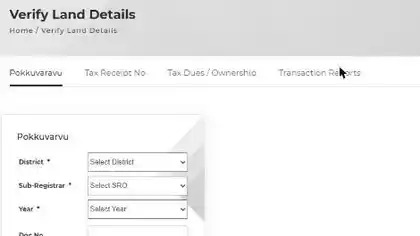
All 14 districts are listed: Thiruvananthapuram, Kollam, Pathanamthitta, Alappuzha, Kottayam, Idukki, Ernakulam, Thrissur, Palakkad, Malappuram, Kozhikode, Wayanad, Kannur and Kasaragod. District names appear in Malayalam in the drop-down.
How to Pay Kerala Land Tax (Basic Tax) Online
The official e-Services help page lists these payable items: Basic Tax (with KAWWF subscription), Pokkuvaravu fee (transfer of registry), fee for thandaper copy and fee for location sketch. You can pay by debit/credit card, UPI, internet banking or Bharat QR.
- Register and log in on Revenue e-Services (Citizen Registration, then Citizen Login).
- Go to New Request and select Land Tax.
- Fill in the details, click View and Add and check the land shown is correct, then submit.
- Wait for the approval SMS on your registered mobile (the village office verifies the request).
- Log in again, open My Request and click Pay Now.
- Download the receipt after payment. For later years, log in, open Transaction History and click Pay Now.
In digitally resurveyed villages you can pay tax on Ente Bhoomi instead. Ente Bhoomi’s own guideline says only land owned by the registered person can be paid this way, and the first tax payment after digital survey also includes a survey charge.
How to Apply for Pokkuvaravu (Mutation) Online
ReLIS links the Revenue department with the Registration and Survey departments, so mutation of a registered deed can be tracked with the deed number on the Verify Land page. For other cases, the e-Services portal offers ePokkuvaravu for these categories: succession mutation, mutation based on court decree and others.
- Log in to Revenue e-Services, go to New Request and select Pokkuvaravu.
- Fill the basic details and enter the thandaper number of the seller/transferor, then click landholders to display their land.
- If the buyer/transferee already has a thandaper number, enter it under Buyer Info and click View.
- If not, click Add New Thandapper to get a system-generated thandaper number and fill the buyer’s details in the pop-up.
- Click Save & Forward to submit. Track it under My Request; SMS (and Sandes) alerts come at each stage.
LRM: Correct Errors in Kerala Land Records
Use LRM (Resurvey Correction) to fix sub-division changes, area alterations, survey and boundary demarcation, name and other details, and land type. Log in, go to New Request, select LRM, pick the request type, fill the mandatory fields and click Save & Forward. In villages where digital survey records are final and handed over to Revenue, apply for LRM (boundary re-fixing, area difference, sub-division, name change, conversion) on Ente Bhoomi.
If the digital survey shows a wrong old survey number, Ente Bhoomi has a separate Co-relation Correction application for that.
Ente Bhoomi Portal: Services and How to Register
Ente Bhoomi is the citizen portal of Kerala’s Integrated Land Information and Management System (ILIMS), part of the Digital Resurvey Mission. It brings Revenue, Registration and Survey department services under one single sign-on login (passkey login with face lock, fingerprint or PIN is also supported). Services listed on the portal:
| Service | What it does | Department |
|---|---|---|
| Aadhaar e-KYC | Link thandaper with Aadhaar in villages where Section 13 is published | Revenue |
| Digital Survey | Check land details of villages where digital survey is in progress | Survey |
| Ente Bhoomi (my land) | See land linked to your mobile / Aadhaar | Revenue |
| Pay tax | Pay land tax online | Revenue |
| Pre-mutation application | Sketch / thandaper certificate of the property to be transferred | Revenue |
| LRM application | Corrections in finalised digital survey villages | Revenue |
| Land bank | Search details of any finalised land parcel | Revenue |
| Land transactions | Apply for land transfer, template-based registration with digital stamp paper | Revenue, Registration, Survey |
| Location sketch | Official location sketch of your land | Revenue |
| Survey records | Search and buy survey records | Survey |
| Thandaper copy | Apply for a copy of thandaper | Revenue |
| eBTR | Apply for eBTR of your property | Revenue |
| Application status | View status without logging in | All |
Registration rule (official guideline): register with the mobile number that was linked to your land and OTP-verified during digital survey. If that number is unavailable or was recorded wrongly, register with the mobile number linked to your Aadhaar. Land details can be viewed only for villages where digital survey is complete and finally notified. Ente Bhoomi also notes that the Government has revised the fee for Land Parcel Maps (LPM) requested per survey number; the current fee is shown on the portal.
Which Portal Should You Use?
| Your situation | Use |
|---|---|
| Village not yet digitally resurveyed | Revenue e-Services (revenue.kerala.gov.in) |
| Digital survey in progress | Ente Bhoomi “Digital Survey” view + Revenue e-Services for tax |
| Digital survey final (Section 13 published) | Ente Bhoomi for tax, thandaper copy, eBTR, LRM, sketch, transfers |
| Only want to verify a deed or tax receipt | Revenue e-Services Verify Land (no login) |
| Want the map | Bhunaksha Kerala (emaps.kerala.gov.in) |
Common Problems and Fixes
| Problem | Fix |
|---|---|
| OTP not coming | Use the mobile linked to the land in ReLIS; install Sandes and register with that number for OTP and status messages. |
| Land not showing on Ente Bhoomi | Digital survey may not be finalised in your village; use Revenue e-Services. If finalised, register with the OTP-verified survey mobile or Aadhaar mobile. |
| Tax request pending | The village officer must approve before you can pay; wait for the approval SMS, then Pay Now under My Request. |
| Wrong area / name / land type | File LRM (Resurvey Correction) on e-Services, or on Ente Bhoomi for finalised villages. |
| Wrong old survey number after digital survey | Apply for Co-relation Correction on Ente Bhoomi. |
| Higher first tax bill after resurvey | The first payment after digital survey includes a survey charge. |
Other state guides: land records of all states (hub), Tamil Nadu patta chitta and Karnataka Bhoomi RTC.
FAQs
Q. How can I check land details in Kerala online?
A. Use the Verify Land page on revenue.kerala.gov.in (no login) or, for digitally resurveyed villages, log in to Ente Bhoomi (entebhoomi.kerala.gov.in) and open your land details.
Q. What is thandaper number in Kerala?
A. Thandaper is the landholder account number in a village. All land of one person in that village is listed under it, and it is needed for tax payment and mutation.
Q. How do I pay land tax online in Kerala?
A. Log in to Revenue e-Services, New Request > Land Tax, submit, wait for the approval SMS, then My Request > Pay Now. In finalised digital-survey villages, pay on Ente Bhoomi.
Q. How do I check pokkuvaravu (mutation) status?
A. On revenue.kerala.gov.in > Verify Land > Pokkuvaravu tab, select District, SRO and Year and enter the document number and date.
Q. What is Ente Bhoomi portal?
A. It is the citizen portal of Kerala’s Integrated Land Information and Management System under the Digital Resurvey Mission, combining Revenue, Registration and Survey services with one login.
Q. Which mobile number should I use to register on Ente Bhoomi?
A. The mobile linked and OTP-verified during digital survey. If unavailable or wrong, use your Aadhaar-linked mobile.
Q. Can I get a thandaper copy online?
A. Yes. Apply on Revenue e-Services (fee payable online) or on Ente Bhoomi’s thandaper copy service. Approved copies can also arrive through the Sandes app.
Q. Why is my first tax after digital survey higher?
A. Ente Bhoomi guidelines say a survey charge is collected along with land tax on the first payment after digital survey.
Source: Kerala Revenue Department e-Services portal (revenue.kerala.gov.in: Verify Land, e-Services Help for Taxes & Fees, LRM and ePokkuvaravu) and Ente Bhoomi portal home page and guidelines (entebhoomi.kerala.gov.in), checked 26 November 2026. NaukriWatch is not a government website.
Official links
Always verify dates and fees on the official website before applying.
Get free job alerts
New govt, bank and teaching jobs, admit cards and results. No spam.