Last updated:
Need your Aadhaar card urgently but the mobile number linked to Aadhaar is lost, switched off or was never registered? This is one of the most searched Aadhaar problems in India, and a lot of websites still describe shortcuts that UIDAI has closed. This guide tells you exactly what works in November 2026, based on what the official myAadhaar portal, the Aadhaar App FAQ and the UIDAI Aadhaar Online Services FAQ say today.
In short: every online route to download Aadhaar needs an OTP, but you have three legal ways out. You can update your mobile number through the new Aadhaar app using face authentication, update it at an Aadhaar enrolment centre with your fingerprint or iris, or get a printout of your Aadhaar at a centre after biometric verification. Below are the step-by-step methods, fees, documents, mistakes to avoid and FAQs.
Official links
Always verify dates and fees on the official website before applying.
Quick answer: You cannot download e-Aadhaar online without an OTP on the mobile number linked to your Aadhaar. UIDAI’s myAadhaar portal marks Download Aadhaar, Order PVC Card and Update Address as “Mobile OTP is required”. If your number is lost, closed or never linked, either link a working number first (Aadhaar app with face authentication, or any Aadhaar enrolment centre with your fingerprint/iris) and then download, or visit an Aadhaar Seva Kendra / enrolment centre to get your Aadhaar printed after biometric verification.
Aadhaar Download Without Mobile Number: At a Glance
| Method | What you need | Fee |
|---|---|---|
| Download e-Aadhaar on myAadhaar | Needs OTP on registered mobile (portal label: “Mobile OTP is required”) | Free |
| Order Aadhaar PVC card online | Needs OTP on registered mobile; registered-mobile holders can order for self or others | ₹75 (incl. GST and speed post) |
| Update mobile number in Aadhaar app | Register with face authentication, then use Mobile Number Update | Fee shown in app |
| Update mobile at enrolment centre | Fingerprint / iris verification; no document needed for mobile | Charges applicable at centre |
| Get Aadhaar printed at a centre | Biometric verification at Aadhaar Seva Kendra / enrolment centre | Nominal charge shown at centre |
Source: myAadhaar portal (myaadhaarbeta.uidai.gov.in) service cards and UIDAI FAQs on uidai.gov.in, checked 26 November 2026.
Can You Download Aadhaar Without a Registered Mobile Number?
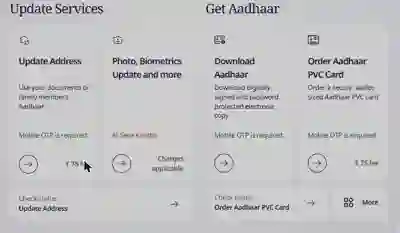
Not online. UIDAI’s official FAQ says plainly that a mobile number should be registered to Aadhaar for using online services. On the myAadhaar portal, the Download Aadhaar card is labelled “Mobile OTP is required”, and the same label sits on Order Aadhaar PVC Card, Update Address, Download Masked Aadhaar, Generate VID and Lock/Unlock Aadhaar.
UIDAI lets you download e-Aadhaar using four identifiers: Aadhaar number, Enrolment ID (EID), Virtual ID (VID) or SID. All of them still send the OTP to the number in your Aadhaar record. Entering a different number does not work, because the OTP never goes to an unlinked number.
That is why websites that promise “Aadhaar download without OTP” or “without registered mobile” are either outdated or unsafe. Never give your Aadhaar number, photo or fingerprint to an unofficial app or agent who claims to bypass OTP.
Method 1: Update Your Mobile Number in the Aadhaar App (No Queue)
The new official Aadhaar app by UIDAI (Android 9.0+ and iOS 16.0+) offers Mobile Number Update from your phone. According to a PIB release of 20 August 2026, more than 60 lakh people had already updated their mobile number through the app. The registration steps listed by UIDAI use face authentication, not an OTP to your old number.
- Install the official Aadhaar app published by UIDAI from Google Play (package in.gov.uidai.pehchaan) or the App Store. Avoid look-alike apps.
- Put the SIM of the new mobile number you want to link in the phone, with internet on.
- Open the app, select your language and enter your 12-digit Aadhaar number.
- Accept the Terms and Conditions and Privacy Policy.
- Choose the SIM card when asked.
- Complete face authentication: look at the camera in good light, without glasses or a mask.
- Set a 6-digit PIN to secure the app.
- Open the Mobile Number Update service, follow the steps and pay the fee shown on screen.
- Note the request number and track it with Track my request in the app.
- Once the update is approved, download e-Aadhaar in the app or on myAadhaar with an OTP on the new number.
If face authentication keeps failing (common for elderly people or when the Aadhaar photo is very old), use Method 2 at a centre instead.
Method 2: Update Mobile Number at an Aadhaar Enrolment Centre
UIDAI’s FAQ answer to “Where can I update my mobile number?” is: by visiting any Aadhaar Enrolment Centre. You can find one on the Bhuvan Aadhaar locator (bhuvan-app3.nrsc.gov.in/aadhaar/) or the Seva Kendra page on myAadhaar.
- Find the nearest Aadhaar Seva Kendra or enrolment centre (banks, post offices and government offices often host one).
- Book an appointment online if the centre allows it, or go early in the day.
- Carry your Aadhaar number (any old photocopy or the EID slip helps) and the new mobile phone.
- Fill the update form for mobile number. No proof document is needed for a mobile update.
- Give your fingerprint or iris scan to verify that you are the Aadhaar holder.
- Pay the charges and keep the acknowledgement slip with the URN.
- Wait for the SMS confirming the update, then download e-Aadhaar online with an OTP on the new number.
Method 3: Get Your Aadhaar Printed at a Centre
If you need a copy today and cannot wait for the mobile update, ask at an Aadhaar Seva Kendra or enrolment centre for an Aadhaar print after biometric authentication. The operator verifies your fingerprint or iris and prints your Aadhaar for a small charge. Ask the centre to update your mobile number at the same visit so you never face this problem again.
What About the Aadhaar PVC Card?
Many old guides say you can order an Aadhaar PVC card with any mobile number. Check the current rule: UIDAI’s FAQ says an Aadhaar number holder with a registered mobile number logs in with the 12-digit Aadhaar number to order, and a holder whose mobile is registered can order PVC cards for self or others. The myAadhaar portal also marks Order Aadhaar PVC Card as “Mobile OTP is required”.
| PVC card point | Official detail |
|---|---|
| Fee | ₹75 (inclusive of GST and speed post charges) |
| Delivery | Normally within 10 working days (excluding the day of request) by India Post speed post |
| Delivery address | The address in your Aadhaar record |
| Payment | Credit card, debit card, net banking, UPI, wallet |
| Reorder | Allowed, multiple times |
| Changes on the card | Update details in Aadhaar first; the card prints what is in your record |
So if a family member has a registered mobile, they may be able to order a PVC card for you, but the card still goes to the address in your Aadhaar. The fastest permanent fix remains linking your own working number.
e-Aadhaar Password and Validity
Once you download e-Aadhaar, the PDF is password protected. The password is the first 4 letters of your name in CAPITAL letters plus your year of birth (YYYY). UIDAI’s examples: SURESH KUMAR born 1990 = SURE1990; SAI KUMAR = SAIK1990; P. KUMAR = P.KU1990; RIA = RIA1990.
UIDAI says a downloaded e-Aadhaar is equally valid as other forms of Aadhaar. You can also choose Masked Aadhaar, which hides the first 8 digits and shows only the last 4, which is safer for hotels and offices.
How to Check Which Mobile Number Is Linked to Your Aadhaar
Not sure whether your current number is the one in Aadhaar? Use Check Email / Mobile Link on the myAadhaar portal. Enter your Aadhaar number and the mobile number you think is linked; the portal tells you whether that number matches your record. If it says the number is not linked, use Method 1 or 2.
Common Problems and Fixes
| Problem | What to do |
|---|---|
| OTP not coming on old number | The number may be closed or recycled. Do not try other numbers. Update the mobile (Method 1 or 2). |
| Face authentication fails in the app | Use better light, remove glasses, hold the phone at eye level. If it still fails, go to an enrolment centre. |
| Fingerprint fails at centre | Ask for iris authentication. If both fail, the centre can guide you on a biometric update. |
| Agent asks for money to “download without OTP” | Refuse. There is no official OTP bypass. Report misuse to UIDAI helpline 1947. |
| Lost Aadhaar number too | Use Retrieve Lost UID on myAadhaar (needs registered mobile/email), or visit a centre with biometrics. |
| PVC card order fails | Your mobile must be registered. Fix the mobile first, then reorder. |
Related guides on NaukriWatch: Aadhaar authentication history check and Aadhaar bank seeding status (NPCI).
Official links
Always verify dates and fees on the official website before applying.
FAQs
Q. Can I download Aadhaar without a registered mobile number?
A. No. UIDAI requires an OTP on the registered mobile for online download. Link a working number via the Aadhaar app or an enrolment centre, or get a print at a centre after biometric verification.
Q. Can I download e-Aadhaar with a non-registered mobile number?
A. No. The OTP is always sent to the number in your Aadhaar record, whether you enter Aadhaar number, Enrolment ID, VID or SID.
Q. How can I update my Aadhaar mobile number without visiting a centre?
A. Use the official Aadhaar app. Registration uses face authentication, and the app offers a Mobile Number Update service. Over 60 lakh people had used it by August 2026.
Q. Where can I update my mobile number offline?
A. At any Aadhaar enrolment centre or Aadhaar Seva Kendra. Find one on the Bhuvan Aadhaar locator. Only biometric verification is needed, no document.
Q. Can I order an Aadhaar PVC card without a registered mobile?
A. As per the current UIDAI FAQ, the ordering holder needs a registered mobile, and such a holder can order for self or others. The fee is ₹75 and delivery is within about 10 working days to your Aadhaar address.
Q. What is the password of the e-Aadhaar PDF?
A. First 4 letters of your name in capitals plus your birth year, for example SURE1990.
Q. Is a downloaded e-Aadhaar valid?
A. Yes. UIDAI says the downloaded e-Aadhaar is as valid as other forms of Aadhaar.
Q. How do I check which mobile number is linked to my Aadhaar?
A. Use Check Email / Mobile Link on the myAadhaar portal to verify whether a number matches your Aadhaar record.
Sources: UIDAI Aadhaar Online Services FAQ and Aadhaar App FAQ (uidai.gov.in), myAadhaar portal service cards, PIB release “Aadhaar App Crosses 5 crore Downloads” (20 Aug 2026). Checked 26 November 2026. NaukriWatch is not a government website.
Get free job alerts
New govt, bank and teaching jobs, admit cards and results. No spam.