
Last updated:
Scheme money not reaching your bank account? PM Kisan, scholarships, LPG subsidy, pension, Ladli Behna, Ladki Bahin and almost every other government cash scheme now pays through Aadhaar-based Direct Benefit Transfer (DBT). For that, your Aadhaar must be seeded with one bank account in the NPCI mapper. If it is not, or if it is seeded with an old or closed account, the payment fails or goes to the wrong account.
This guide shows how to check your Aadhaar bank seeding status online on the official myAadhaar portal (and the NPCI alternative UIDAI names), what “seeding” actually means, how to link Aadhaar with your bank for DBT, how to change the DBT account, and how to fix the common problems. Every rule here is from UIDAI’s official DBT FAQ and the myAadhaar portal, checked on 24 November 2026.
Official links
Always verify dates and fees on the official website before applying.
Quick answer: Open myaadhaar.uidai.gov.in, choose Check Bank Seeding Status, log in with your Aadhaar number and the OTP on your registered mobile, and the page shows whether your Aadhaar is seeded and with which bank. UIDAI fetches this from NPCI. To seed or change the DBT account, visit your bank branch and submit its Aadhaar mandate and consent form. DBT comes to only one account at a time.
Aadhaar Bank Seeding at a Glance
| Item | Details |
|---|---|
| What is seeding | Linking your Aadhaar to one bank account in the NPCI mapper, making it your DBT-enabled account |
| Who does the seeding | Your bank, after you submit its Aadhaar mandate and consent form |
| Where to check status | myaadhaar.uidai.gov.in, service “Check Bank Seeding Status” |
| Login needed | Aadhaar number + OTP on registered mobile |
| Source of the data | NPCI server (UIDAI only displays it and does not store it) |
| Alternative check | NPCI website link given by UIDAI: base.npci.org.in (seeding request details) |
| How many DBT accounts | Only one at a time, the account you chose in the mandate form |
| Change DBT account | Submit the mandate and consent form at the new bank’s branch |
| Helpline | UIDAI 1947; for the bank side, your bank’s branch or customer care |
What Does Aadhaar Bank Seeding Mean?
Your bank account can be “linked” to Aadhaar in two different ways, and many people mix them up:
| Type | What it means |
|---|---|
| Aadhaar linked for KYC | The bank has your Aadhaar in its records as identity proof. This alone does NOT make the account receive DBT. |
| Aadhaar seeded in NPCI mapper | The bank has mapped your Aadhaar to this account in the NPCI mapper with your consent. Government DBT payments sent “to Aadhaar” land in this account. |
UIDAI’s FAQ says: to receive DBT benefits, visit the branch where your account is, request the bank to link your Aadhaar by filling its mandate and consent form, and “this account will be seeded with NPCI-mapper by the bank to operate as DBT enabled account”. The NPCI mapper is a central list that tells government payment systems which bank holds the DBT account of each Aadhaar number.
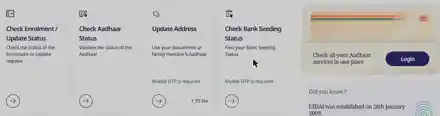
How to Check Aadhaar Bank Seeding Status Online
- Open the official portal myaadhaar.uidai.gov.in.
- On the home page, under Popular Aadhaar Services or Check status, click Check Bank Seeding Status (“Find your Bank Seeding Status, Mobile OTP is required”).
- Log in: enter your 12-digit Aadhaar number and the captcha, click Send OTP, and enter the OTP sent to your Aadhaar-registered mobile.
- The result shows your bank seeding status and the bank name with which your Aadhaar is mapped (as fetched from NPCI).
- Note the bank name. If it is wrong, old or shows not seeded, follow the fix steps below.
UIDAI adds a caution: the status shown on myAadhaar is fetched from NPCI’s server, UIDAI is not responsible for its correctness, and the information is not stored by UIDAI. If what you see looks wrong, your bank is the right place to confirm and correct it.
Alternative: check on NPCI’s website
UIDAI’s DBT FAQ also gives an NPCI link to check seeding: base.npci.org.in (seeding request details page). The NPCI site may not open on some networks; if so, use myAadhaar or ask your bank.
How to Seed Aadhaar With Your Bank Account for DBT
- Go to the branch of the bank where you want DBT money to come.
- Ask for the Aadhaar seeding / DBT mandate and consent form (names vary by bank).
- Fill in your account number and Aadhaar number, tick consent to link Aadhaar with NPCI mapper for receiving DBT, and sign.
- Attach a self-attested copy of your Aadhaar if the bank asks. Some banks verify you by biometric or OTP authentication instead.
- Take the acknowledgement slip. The bank uploads the request to NPCI.
- Check status again on myAadhaar after some days. Ask your bank whether it also accepts seeding requests through net banking, mobile banking or Bank Mitra.
Your name in Aadhaar and in the bank account should match. If it does not, UIDAI advises updating Aadhaar at an enrolment centre with proof of identity, or getting the bank record corrected.
How to Change the Bank Account for DBT
UIDAI’s answer is simple: to change the account for receiving DBT funds, visit the respective bank branch and submit the mandate and consent form provided by your bank. When the new bank seeds your Aadhaar, the NPCI mapper points to the new account and future DBT goes there. This matters if your old account is closed, frozen, dormant or a small account that hit its limit.
Do not close the old account before the new seeding shows on myAadhaar, or a payment in between could bounce.
I Have Many Bank Accounts. Where Will DBT Come?
Only one. UIDAI says you can receive DBT benefits in one account of your choice, the one you named in the mandate and consent form. If you seed a new account, confirm on myAadhaar that the bank name has changed. Some schemes still pay to the account number registered in their own database (not Aadhaar-based), so check the scheme portal too.
Common Problems and Fixes
| Problem | What to do |
|---|---|
| Status shows “not seeded” / inactive | Visit your bank and submit the DBT mandate and consent form; recheck after some days |
| Seeded with an old or closed account | Seed the account you use now (new bank form); keep the old one open until status changes |
| OTP not received on myAadhaar | Your mobile may not be linked to Aadhaar; check “Check Email / Mobile Link” or update mobile at an Aadhaar centre |
| Name mismatch between bank and Aadhaar | Update Aadhaar name at an enrolment centre, or correct bank records |
| Fingerprint fails at bank for seeding | Try other fingers or face/iris/OTP if the bank supports it; update biometrics if it keeps failing |
| Scheme says “Aadhaar not seeded / NPCI inactive” | Seed or re-seed at bank, then ask the scheme office to retry payment |
How to Know DBT Money Has Come
UIDAI says: if you have SMS alerts from your bank, you get an SMS when DBT funds arrive. You can also check your balance through ATM, micro-ATM/Bank Mitra, internet or mobile banking, or phone banking. Bank Mitras (banking correspondents) and post offices also give doorstep cash withdrawal, deposit, balance enquiry and mini statement using Aadhaar.
For scheme-specific payment status, use the scheme portal, for example our guides on PM Kisan eKYC and status and NSP scholarship.
Why Government Asks for Aadhaar for Benefits
Under section 7 of the Aadhaar Act, 2016, Central or State Governments may require Aadhaar for benefits or subsidies funded from the Consolidated Fund of India or of a State. UIDAI says this helps identify the right beneficiaries and remove fake or duplicate entries, and Aadhaar-based DBT means nobody else can claim your benefit by impersonating you. If you do not have Aadhaar yet, you can present your enrolment ID (EID) and other IDs allowed by the scheme until Aadhaar is issued.
FAQs
Q. How can I check my Aadhaar bank seeding status?
A. On myaadhaar.uidai.gov.in, click Check Bank Seeding Status, log in with your Aadhaar number and OTP on your registered mobile, and see the seeding status and bank name.
Q. What is NPCI mapper?
A. It is NPCI’s central list that maps each Aadhaar number to one bank account for receiving Aadhaar-based DBT payments. Your bank adds you to it after you submit the Aadhaar mandate and consent form.
Q. Is Aadhaar linking for KYC the same as DBT seeding?
A. No. KYC linking only stores Aadhaar as ID proof. DBT needs your Aadhaar to be seeded in the NPCI mapper for that account.
Q. Can I get DBT in two bank accounts?
A. No. DBT comes to only one account at a time, the one you chose in the mandate and consent form.
Q. How do I change my DBT bank account?
A. Visit the branch of the new bank and submit its Aadhaar mandate and consent form. After seeding, DBT goes to the new account.
Q. Why does myAadhaar show a wrong bank?
A. UIDAI fetches this data from NPCI and does not store or verify it. Ask your bank to correct or re-seed your Aadhaar.
Q. Can I check bank seeding without a registered mobile number?
A. The myAadhaar service needs OTP on your registered mobile. Without it, ask your bank branch to check, or update your mobile at an Aadhaar centre first.
Q. How long does seeding take?
A. It depends on the bank. The bank uploads your request to NPCI after you submit the form. Recheck on myAadhaar after some days and keep your acknowledgement slip.
Source: UIDAI Direct Benefit Transfer FAQ (uidai.gov.in/en/direct-benefit-transfer) and myAadhaar portal services list (myaadhaar.uidai.gov.in), checked 24 November 2026. Processing time and bank-side channels vary by bank. NaukriWatch is not a government website.
Official links
Always verify dates and fees on the official website before applying.
Get free job alerts
New govt, bank and teaching jobs, admit cards and results. No spam.