Last updated:
Wrong name, photo, age or address on your voter ID card? You do not need a new registration. The Election Commission of India (ECI) uses one form, Form 8, for four jobs: correcting entries in the electoral roll, shifting your residence, getting a replacement EPIC (voter ID card), and marking yourself as a Person with Disability (PwD). You can fill it online on the official Voters’ Service Portal or the ECINET app, and track it until the corrected card is issued.
This guide covers voter ID correction online with Form 8 step by step, which documents to attach for each change, how shifting and replacement EPIC work, how to track status, and the rules from ECI’s official Form 8 guidelines and FAQ, checked on voters.eci.gov.in on 24 November 2026.
Official links
Always verify dates and fees on the official website before applying.
Quick answer: Go to voters.eci.gov.in, log in (or sign up with your mobile), click Fill Form 8 under “Correction Of Entries”, enter your EPIC number, tick what you want (shifting, correction, replacement EPIC or PwD marking), upload a supporting document, submit, and note the reference number. Track it under Track Application Status. After approval, the ERO issues a new EPIC with the same EPIC number. Helpline: 1950.
Voter ID Correction (Form 8) at a Glance
| Item | Details |
|---|---|
| Form | Form 8 (Correction Of Entries) |
| Used for | Correction of entries, shifting of residence, replacement EPIC without correction, marking as PwD |
| Who can apply | A registered (enrolled) elector |
| Where | voters.eci.gov.in, ECINET app, or offline to the ERO/BLO |
| Overseas electors | “Form 8 Overseas (Self Correction Only)” |
| EPIC number after correction | Same number; a new EPIC card is issued |
| Old card | Must be returned to the ERO after the new EPIC is issued |
| Track | Track Application Status on voters.eci.gov.in |
| Helpline | 1950 (toll-free), complaints@eci.gov.in |
What You Can Do With Form 8
| Option | When to use it |
|---|---|
| Shifting of residence | Moved to a new address (same or another constituency). Apply to the ERO of the constituency where your new address is. Attach address proof. |
| Correction of entries | Fix name, photo, age/date of birth, gender, relative’s name, relation type, address details etc. Tick the box and attach a document supporting the claim. |
| Replacement EPIC without correction | Card lost, damaged or mutilated. Return the old card or attach a copy of FIR/police report for a lost card. |
| Marking as PwD | Get yourself marked as a Person with Disability in the roll, so polling facilities can be arranged. |
Only one option is ticked per application, and you fill only the matching section. ECI’s guidelines say all other sections that are not relevant should be struck off.
How to Apply for Voter ID Correction Online (Step by Step)
- Open the official Voters’ Service Portal: voters.eci.gov.in (or the ECINET mobile app).
- Click Login. New users click Sign-Up and register with mobile number and OTP.
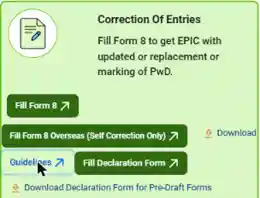
- On the home page, in the Correction Of Entries box, click Fill Form 8.
- Choose whom the application is for (self or family member, as the form offers) and enter the EPIC number.
- Fill Item I: your name, EPIC number, Aadhaar number, mobile number and email (of self or relative). If you do not have Aadhaar, use the option given for that at item I(b).
- In Item II, tick one purpose: shifting of residence, correction of entries, issue of replacement EPIC, or marking as PwD.
- Fill the details for that purpose (for correction, tick each field to correct and enter the right value) and upload the supporting document. For a photo change, upload a recent passport-size colour photo with a white background.
- Read and accept the Declaration, preview, and submit.
- Note the reference number shown on screen. Use it to track your application.
Before filling, keep the documents scanned (clear and readable). If your form is rejected, check the status for the reason and apply again with the right document.
Documents for Voter ID Correction
ECI’s Form 8 guidelines say: for correction, attach a document in support of the claim and write its name in the blank space; for shifting, attach a self-attested copy of one of the address-proof documents listed in the form, in your own name or in the name of your parents or spouse. Typical documents (the form shows the full current list):
| What you are changing | Examples (always follow the list printed in the form) |
|---|---|
| Name / spelling | Aadhaar, PAN card, passport, driving licence, class 10 certificate or other ID with the correct name |
| Date of birth / age | Birth certificate, class 10/12 marksheet with DOB, passport, Aadhaar, PAN, driving licence |
| Address (shifting) | Aadhaar, bank/post office passbook, recent water/electricity/gas bill, passport, registered rent/lease deed or sale deed, as listed in the form |
| Photo | Recent passport-size colour photo, white background (4.5 cm x 3.5 cm on the paper form) |
| Lost card | Copy of FIR / police report |
| Damaged card | Return the mutilated/old EPIC |
If you do not have any of the listed address documents, the guidelines allow you to mention the name of another document in the blank space and attach it. The ERO decides whether it is acceptable.
Shifting Your Voter ID to a New Address
Moved house? Use Form 8 and tick Shifting of residence. Apply to the Electoral Registration Officer of the constituency where your new address is located, mention your new address and attach address proof. When approved, the ERO issues an EPIC with the new address, and the EPIC number stays the same as your old card. You do not need a new Form 6 registration for this.
Note: some older answers on the ECI portal FAQ still mention “Form 8A” for shifting within a constituency. The current form list on voters.eci.gov.in shows only Form 8 for correction and shifting, and the Form 8 guidelines cover shifting, so use Form 8.
Replacement Voter ID Card (Lost or Damaged)
ECI’s FAQ: “A replacement EPIC can be issued to an elector on the receipt of Form-8 for the purpose, along with a copy of FIR/Police Report.” Tick Issue of replacement EPIC without correction in Form 8. If the card is damaged, you return the mutilated/old card. Meanwhile, you can download the digital e-EPIC from the same portal; see our guide on voter ID e-EPIC download.
How to Track Voter ID Correction Status
- Open voters.eci.gov.in and click Track Application Status.
- Enter your Form 8 reference number and select your state.
- Submit to see the current status of your application, including the reason if it was rejected.
You can also use Book a Call with BLO on the portal to talk to your Booth Level Officer, or call 1950.
Important Rules and Penalties
- Only a registered elector can file Form 8; if you are not in the roll at all, use Form 6 (new registration).
- After approval, a new EPIC is issued and you must return your old EPIC to the ERO immediately (Form 8 guidelines).
- Aadhaar is asked for authentication of entries; if you do not have it, the form gives an alternative option.
- The Declaration is legally binding: a false statement is punishable under Section 31 of the Representation of the People Act, 1950, with imprisonment up to one year, fine, or both.
- To remove a name (death, shifting, duplicate), the form is Form 7, not Form 8.
Form 8 vs Form 6 vs Form 7
| Form | Purpose |
|---|---|
| Form 6 | New voter registration (18+ or turning 18) |
| Form 6A | New registration for overseas (NRI) electors |
| Form 7 | Objection to inclusion / deletion of a name from the roll |
| Form 8 | Correction of entries, shifting, replacement EPIC, PwD marking |
FAQs
Q. How can I correct my voter ID card online?
A. Log in on voters.eci.gov.in or the ECINET app, click Fill Form 8, enter your EPIC number, tick Correction of entries, choose the fields to correct, upload a supporting document and submit.
Q. Which form is used for voter ID correction?
A. Form 8. It is also used for shifting residence, replacement EPIC and marking as PwD.
Q. Will my EPIC number change after correction?
A. No. ECI says the ERO issues a new EPIC with the same number after making the corrections.
Q. How do I change my address on voter ID?
A. Fill Form 8, tick Shifting of residence, apply to the ERO of the constituency of your new address and attach a self-attested address proof.
Q. How do I get a duplicate voter ID card if lost?
A. Apply in Form 8 for a replacement EPIC with a copy of the FIR/police report. You can download the e-EPIC meanwhile.
Q. How can I check my voter ID correction status?
A. Use Track Application Status on voters.eci.gov.in with the reference number you got after submitting Form 8.
Q. Can I correct my photo in voter ID?
A. Yes. In Form 8 correction, choose photograph and upload a recent passport-size colour photo with a white background.
Q. Is there any fee for Form 8?
A. ECI’s Form 8 guidelines and the portal form list do not mention any fee for filing Form 8.
Source: Election Commission of India Voters’ Service Portal (voters.eci.gov.in) form list, Form 8 guidelines PDF and portal FAQs, checked 24 November 2026. Document lists may be updated by ECI; follow the list shown in the form you fill. NaukriWatch is not a government website.
Official links
Always verify dates and fees on the official website before applying.
Get free job alerts
New govt, bank and teaching jobs, admit cards and results. No spam.