Last updated:
Want a new smart ration card (மின்னணு குடும்ப அட்டை) in Tamil Nadu, or need to add a newborn, change your address or check where your application has reached? All of this is done on the official Public Distribution System portal tnpds.gov.in, run by the Civil Supplies and Consumer Protection Department, Government of Tamil Nadu. Applying online is simple once you know which page does what and which documents to keep ready.
This guide walks you through every field of the official new smart card form, the card types you can choose, the address proofs accepted, how the reference number and status check work, how to log in for corrections (add or delete a member, change address or head of family), how to get a duplicate card, the e-KYC instruction for AAY and PHH families, the SMS codes and the helpline numbers. Everything below was checked on the tnpds.gov.in portal on 26 November 2026.
Official links
Always verify dates and fees on the official website before applying.
Quick answer: Open tnpds.gov.in > புதிய மின்னணு அட்டை விண்ணப்பிக்க (Apply for New Smart Card), enter the family head’s name and address in English and Tamil, upload the family head’s photo (jpeg/jpg/png, up to 5 MB), choose district, taluk/zone and village, verify your mobile by OTP, add every family member, pick the card type (Rice, Sugar, No Commodity or Others), upload one residence proof (up to 1 MB) if your address differs from Aadhaar, and submit. A reference number comes to your mobile; use it on the Smart Card Application Status page. Helpline: 1967 or 1800-425-5901.
Tamil Nadu Smart Ration Card at a Glance
| Item | Details |
|---|---|
| Department | Civil Supplies and Consumer Protection Department, Government of Tamil Nadu |
| Official portal | tnpds.gov.in (Public Distribution System) |
| New card | Online form “Apply for New Smart Card” (no login needed; mobile OTP) |
| Status check | “Smart Card Application Status” page with the reference number sent to your mobile |
| Corrections | Log in with the mobile number registered with your card (captcha + OTP): add member, change address, change head of family, delete member |
| Card types in the form | Rice Card, Sugar Card, No Commodity Card, Others |
| Photo | Family head photo, jpeg/jpg/png, up to 5 MB |
| Documents | One residence proof, png/gif/jpeg/pdf, up to 1 MB (needed if present address differs from Aadhaar) |
| Helpline | 1967 or 1800-425-5901 (toll free) |
| Smuggling/hoarding complaints | 1800-599-5950 / 9677736557 |
| Scale (portal, 26.11.2026) | 2,30,22,194 family cards, 7,03,51,650 beneficiaries, 34,936 fair price shops, 39 districts, 318 taluks |
Who Can Apply for a Smart Ration Card in Tamil Nadu?
Any family living in Tamil Nadu that does not already have a family card can apply. The application is made in the name of the family head, and all members of the household are added in the same application. A person should not appear on two family cards, so if a member is already on a parent’s card (for example after marriage), that member must first be deleted from the old card before being added to the new one.
At the end of the form you sign a declaration that the details are true to your knowledge. The form itself warns that if any detail is found to be false, the smart card will be cancelled and action can be taken under the Essential Commodities Act, 1955 and other laws. So enter names, dates of birth and relationships exactly as in Aadhaar.
Tamil Nadu Ration Card Types You Can Choose
The new card form asks you to pick one card choice (அட்டை தேர்வு). The options shown on the portal are:
| Card choice | What it means |
|---|---|
| Rice Card (அரிசி அட்டை) | For families who want rice and other PDS items from the fair price shop |
| Sugar Card (சர்க்கரை அட்டை) | For families who want sugar and other items but not rice |
| No Commodity Card (பண்டகமில்லா அட்டை) | No PDS items; the card works as an identity/address document |
| Others (மற்றவை) | Any other category, as decided after verification |
Your choice is a request. The final category (including priority categories such as AAY and PHH under the National Food Security Act) is fixed by the department after field verification. The home page also says that if you no longer need PDS items, you can convert your card into a No Commodity card, and there is a separate link to request a change of card type.
Documents Required for a New Smart Card
- Aadhaar of the family head and every member (names and dates of birth should match Aadhaar).
- Recent photo of the family head: jpeg, jpg or png, up to 5 MB. The form also lets you capture it with a webcam.
- Mobile number for OTP verification. This number is used for all future communication, so give a number you will keep.
- One residence proof (if your present address is different from the one on Aadhaar): png, gif, jpeg or pdf, up to 1 MB.
- Gas connection details, if you have an LPG connection.
Residence proofs accepted on the form
- Aadhaar card
- Electricity bill
- Front page of bank passbook
- Gas consumer card
- Property tax receipt (if you own the house)
- Passport
- Rental agreement (for tenants)
- Slum Clearance Board allotment order
- Telephone bill
- Voter ID card
- Bonded labour release certificate
How to Apply for a Tamil Nadu Smart Ration Card Online
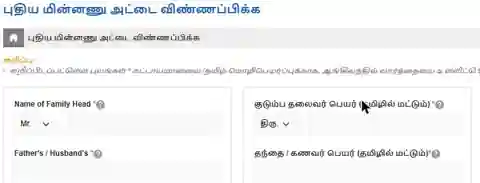
The form is on one page. Fields marked * are compulsory. For the Tamil fields you can type the word in English and press the Spacebar or Tab key, and the portal converts it into Tamil.
- Go to tnpds.gov.in and click புதிய மின்னணு அட்டை விண்ணப்பிக்க (Apply for New Smart Card) under “Smart Card Services”.
- Enter the Name of Family Head with title (Mr./Mrs./Ms.), Father’s / Husband’s name and Address Line 1 (lines 2 and 3 optional) in English.
- Enter the same name, father’s/husband’s name and address in Tamil in the right-hand column (திரு./திருமதி./செல்வி.).
- Upload or capture the family head’s photo (up to 5 MB).
- Select your District (39 entries are listed, with Chennai split into North Chennai and South Chennai), then Zone / Taluk and Village, and enter the PIN code.
- Enter and confirm your mobile number, click Generate OTP and enter the OTP. Phone number and email are optional.
- Under Family member details, add the family head first, then each member with name, gender, whether differently abled, date of birth and relationship.
- Choose the card type (Rice, Sugar, No Commodity or Others).
- Select and upload one residence proof (needed when your current address differs from Aadhaar).
- Fill in gas connection details if you have one, tick the declaration and click பதிவு செய் (Register/Submit).
- Note the reference number sent to your registered mobile. You will need it to check status or resubmit.
How to Check Tamil Nadu Ration Card Application Status
- Open tnpds.gov.in and click மின்னணு அட்டை விண்ணப்பத்தின் நிலை (Smart Card Application Status).
- Enter the reference number (குறிப்பு எண்) that was sent to your mobile when you registered.
- Click Submit to see the current stage of your application.
If the department returns your application for a correction, use the Resubmit Application (மறுபரிசீலனை விண்ணப்பம்) page with the same reference number to fix and send it again. For anything the status page does not explain, the portal tells you to contact the helpline.
Add a Member, Change Address or Head of Family (Login Services)
Corrections to an existing card are made after logging in as a registered user. You are already a registered user if your mobile number was registered with the PDS in any one of these ways: the shopkeeper registered your card through the point-of-sale machine, you registered through the public mobile app, or you registered on the website.
- Click any card-related service on the home page (for example உறுப்பினரை சேர்க்க, Add Member). You are taken to the login page.
- Enter the 10-digit mobile number registered with your family card and the captcha shown on the screen, then click பதிவு செய் (Register).
- Enter the one-time password you receive and click Register again.
- Choose the service you need and submit the request with supporting details.
| Service | When to use it |
|---|---|
| Add member (உறுப்பினரை சேர்க்க) | Newborn, spouse after marriage, or a member who was left out |
| Change address (முகவரி மாற்றம்) | Moving house within Tamil Nadu |
| Change head of family (குடும்ப தலைவர் மாற்றம்) | Death of the head, or the family wants a different head |
| Delete member (குடும்ப உறுப்பினர் நீக்க) | Death, marriage, or moving to another card |
| Add representative (பிரதிநிதி நபரை சேர்க்க) | Authorise a person to collect items on your behalf |
| Card-related service status | Track any of the above requests |
After logging in you can also view your family card details, members, address and the members’ Aadhaar numbers, see and file grievances and feedback, and view your entitlement and sales transactions.
Duplicate Smart Card
If your smart card is lost or damaged, use Apply for Duplicate Smart Family Card (நகல் மின்னணு குடும்ப அட்டை விண்ணப்பிக்க) on the home page; it also works through the registered-user login. Track it on the Duplicate Smart Card Application Status page.
e-KYC for AAY and PHH Ration Cards
A notice on the tnpds.gov.in home page asks all members of AAY and PHH family cards to complete e-KYC by fingerprint or iris verification at the fair price shop in their town, or, if they live in another district or state, at the nearest fair price shop there. Make sure every member on the card completes it so that rations are not stopped. Read our ration card e-KYC guide and the One Nation One Ration Card guide for how portability works.
SMS Services and Helplines
Send these codes by SMS from your registered mobile number to 8939922990:
| SMS (PDS space code) | What you get |
|---|---|
| PDS 101 | Stock of items at your fair price shop |
| PDS 102 | Whether your fair price shop is open or closed |
| PDS 107 | Complaint about the amount charged |
| Purpose | Contact |
|---|---|
| PDS helpline (toll free) | 1967 or 1800-425-5901 |
| Smuggling / hoarding of essential commodities | 1800-599-5950 / 9677736557 |
| Portal and app support | 1800 425 5901, support@tnpds.com |
| Mobile app | Public mobile app for consumers (Android and iOS, linked from the portal home page) |
Common Problems and Fixes
- OTP not received: check that the number is entered correctly in both mobile boxes and try again after a minute; use a number that is active on your phone.
- Lost the reference number: it was sent by SMS to the mobile used in the form; search your messages, or call 1967.
- Login says the mobile is not registered: get your mobile registered with your card at the fair price shop (point-of-sale machine) or through the public app, then log in.
- Photo or document upload fails: keep the photo under 5 MB (jpeg/jpg/png) and the proof under 1 MB (png/gif/jpeg/pdf).
- Tamil text not appearing: type the word in English and press Space or Tab in the Tamil box.
- Application returned: use Resubmit Application with your reference number.
FAQs
Q. How can I apply for a new ration card in Tamil Nadu online?
A. Go to tnpds.gov.in, click Apply for New Smart Card, fill the family head’s details in English and Tamil, upload the photo, verify your mobile by OTP, add all members, choose the card type, upload a residence proof if needed and submit.
Q. How do I check my smart card application status in Tamil Nadu?
A. Open the Smart Card Application Status page on tnpds.gov.in and enter the reference number that was sent to your mobile when you applied.
Q. Which documents are needed for a TN smart ration card?
A. Aadhaar of all members, the family head’s photo, an active mobile number, and one residence proof such as an electricity bill, gas card, bank passbook, rent agreement, voter ID or passport if your address differs from Aadhaar.
Q. How do I add a child’s name to my ration card in Tamil Nadu?
A. Log in on tnpds.gov.in with the mobile number registered with your card (captcha + OTP), choose Add Member, enter the child’s details and submit. Track it under card-related service status.
Q. What are the card types in Tamil Nadu?
A. The online form offers Rice Card, Sugar Card, No Commodity Card and Others. The final category, including AAY and PHH, is fixed after verification.
Q. What is the Tamil Nadu ration card helpline number?
A. Call 1967 or 1800-425-5901 (toll free). For smuggling or hoarding complaints, call 1800-599-5950 or 9677736557.
Q. How do I know if my ration shop is open?
A. Send PDS 102 by SMS from your registered mobile to 8939922990. PDS 101 gives the stock at the shop.
Q. Is e-KYC compulsory for Tamil Nadu ration cards?
A. The department has asked all members of AAY and PHH cards to complete fingerprint or iris e-KYC at any fair price shop, in Tamil Nadu or outside.
Source: Civil Supplies and Consumer Protection Department, Government of Tamil Nadu: tnpds.gov.in home page, Apply for New Smart Card form, Smart Card Application Status, Resubmit Application and registered-user login pages, checked 26 November 2026. NaukriWatch is not a government website; apply only on tnpds.gov.in.
Official links
Always verify dates and fees on the official website before applying.
Get free job alerts
New govt, bank and teaching jobs, admit cards and results. No spam.