Last updated:
An Aadhaar Virtual ID (VID) is a 16-digit number you can give instead of your 12-digit Aadhaar number for e-KYC, OTP verification, downloading e-Aadhaar or locking your Aadhaar biometrics. It protects your real Aadhaar number, and you can change it whenever you like. This guide shows every official way to generate a VID, retrieve a forgotten one and replace it, with the rules UIDAI lists in its own FAQs on the myAadhaar portal (checked 26 November 2026).
Quick answer: To generate an Aadhaar Virtual ID (VID), open UIDAI’s myAadhaar VID generator, choose Generate VID, enter your Aadhaar number and captcha, and verify the OTP sent to your Aadhaar-registered mobile. The 16-digit VID arrives by SMS. Without internet, send GVID <last 4 digits of Aadhaar> by SMS to 1947 from your registered mobile. Forgot your VID? Choose Retrieve VID or send RVID <last 4 digits> to 1947. UIDAI charges no fee for a VID.
Official links
Always verify dates and fees on the official website before applying.
What Is an Aadhaar Virtual ID (VID)?
UIDAI describes the VID as a temporary, revocable 16-digit random number mapped to your Aadhaar number. Wherever a service does Aadhaar authentication or e-KYC, you can type the VID in place of the Aadhaar number, and the authentication works the same way. Nobody can work out your Aadhaar number from a VID.
| Point | Rule (UIDAI FAQ) |
|---|---|
| Length | 16 digits (Aadhaar number is 12 digits) |
| Who can create it | Only the Aadhaar number holder; no bank, telecom or other agency can generate it for you |
| How many at a time | Only one VID is valid at any time |
| Minimum validity | 1 calendar day (till midnight); after that you can generate a new one |
| What happens on regeneration | A new VID is issued and the old one stops working |
| Cost | No fee on myAadhaar or the app |
| Delivered by | SMS to the mobile number registered with Aadhaar |
| Needs registered mobile? | Yes, for OTP on the portal and for the 1947 SMS route |
Why use a VID instead of your Aadhaar number?
- Your real number stays private. Apps, shops and websites that only need to confirm your identity never see your 12-digit Aadhaar.
- You can kill a leaked VID. If you typed your VID on a doubtful site, generate a new one the next day and the old one stops working. You cannot do that with your Aadhaar number.
- It is needed for Aadhaar lock. Once you lock your Aadhaar number (UID lock), services work only with your VID, so generate and save it first.
- It works for every kind of authentication. OTP, fingerprint/iris and demographic checks all accept VID in place of Aadhaar.
Safety tips: never share the OTP that comes with a VID request; UIDAI or a bank will never ask for it on a call. Generate VIDs only on myaadhaar.uidai.gov.in, the official Aadhaar app or by SMS to 1947, never on third-party “VID generator” websites, because they would need your Aadhaar number and OTP. If you get a VID SMS you did not request, someone tried with your number: check your authentication history and consider locking biometrics.
Method 1: Generate VID on myAadhaar (Online)
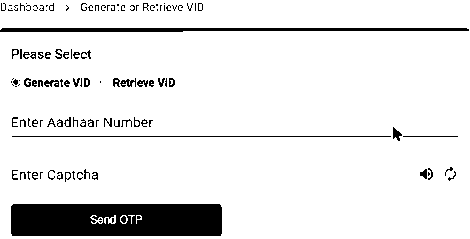
- Open the official VID generator: myaadhaar.uidai.gov.in → VID generator. You can also reach it from the myAadhaar home page tile “VID generator: Click here to generate 16 Digit Virtual ID (VID) linked to your Aadhaar”.
- Under “Please Select”, keep Generate VID selected.
- Type your 12-digit Aadhaar number and the captcha shown.
- Click Send OTP. A one-time password goes to the mobile number linked with your Aadhaar.
- Enter the OTP and submit. Your 16-digit VID is sent to the same mobile by SMS.
- Save the SMS. The VID stays valid until you generate a new one.
Method 2: Generate VID by SMS to 1947 (No Internet)
From the mobile number registered with your Aadhaar, send an SMS to the UIDAI helpline 1947 in this format:
| Purpose | SMS text (example) | How to type |
|---|---|---|
| Generate a new VID | GVID 1234 | GVID followed by the last 4 digits of your Aadhaar |
| Retrieve your current VID | RVID 1234 | RVID followed by the last 4 (or 8) digits of your Aadhaar |
The reply SMS carries your VID. If you send from any number that is not linked to Aadhaar, nothing comes back. Normal SMS charges of your operator may apply.
Method 3: Inside e-Aadhaar Download and the Aadhaar App
UIDAI also lists the e-Aadhaar download flow and its mobile app (mAadhaar / the new Aadhaar app) as places to generate, retrieve or replace a VID. On the app, log in with your Aadhaar and OTP and look for the VID option in the services list. When you download e-Aadhaar you can log in with VID instead of the Aadhaar number (see our Aadhaar card download guide).
How to Retrieve a Forgotten VID
- Online: open the same VID generator page, choose Retrieve VID, enter Aadhaar number and captcha, verify OTP. The last active VID is sent by SMS.
- SMS: send RVID <last 4 digits of Aadhaar> to 1947 from your registered mobile.
- If you locked your Aadhaar and forgot the VID, UIDAI says to use the RVID SMS service; the VID comes to your registered mobile.
Retrieving does not change the number. It simply re-sends the VID that is currently active.
Where You Can Use a VID
| Task | How VID helps | Our guide |
|---|---|---|
| Download e-Aadhaar | Log in with VID + OTP instead of Aadhaar number | Aadhaar download |
| Lock / unlock Aadhaar (UID lock) and biometrics | Locking the Aadhaar number needs your VID; keep it safe before you lock | Biometric lock/unlock |
| Authentication history | Check who used your Aadhaar with Aadhaar or VID + OTP | Authentication history |
| e-KYC at banks, telecom, fintech apps | Give VID instead of Aadhaar number for OTP / biometric KYC | Ask the agency if it accepts VID |
Rules Agencies Must Follow with VID
- Your consent is needed for every VID-based authentication. The agency must tell you the purpose and take your explicit consent.
- Agencies must not store your VID in any database or log, since it is temporary and you can change it.
- VID can be used for OTP, biometric and demographic authentication, exactly like the Aadhaar number.
VID vs Masked Aadhaar vs Aadhaar Number
| ID | Format | Validity | Best use |
|---|---|---|---|
| Aadhaar number | 12 digits | Permanent | Full identity number; share only when legally required |
| Masked Aadhaar | Shows only last 4 digits | Same as Aadhaar | A downloaded copy with first 8 digits hidden; good for paper KYC |
| Virtual ID (VID) | 16 digits | Changeable any day after 1 day validity | For online authentication without revealing Aadhaar number |
Troubleshooting
| Problem | What to do |
|---|---|
| OTP not received | Mobile is not registered or was changed. Update mobile at an Aadhaar centre or via the Aadhaar app (see mobile update guide). |
| SMS to 1947 gets no reply | Send from the registered mobile; check format (GVID / RVID, a space, last 4 digits); try again after some time. |
| Cannot generate a new VID today | You generated one today. The minimum validity is 1 calendar day; try after midnight. |
| Old VID not working | A new VID was generated, so the old one is deactivated. Retrieve the current VID with RVID. |
| Agency rejects VID | Not every service accepts VID. Use masked Aadhaar for paper KYC instead. |
FAQs
Q. Is Aadhaar VID generation free?
A. UIDAI lists no fee for generating or retrieving a VID on myAadhaar. The 1947 SMS route may cost a normal SMS as per your mobile plan.
Q. How many digits is a VID?
A. 16 digits. Your Aadhaar number has 12 digits.
Q. Can I have two VIDs at the same time?
A. No. Only one VID is valid at any time. Generating a new one deactivates the old one.
Q. How often can I change my VID?
A. After the minimum validity of 1 calendar day (till midnight). After that you can regenerate whenever you need.
Q. Can my bank generate a VID for me?
A. No. UIDAI says no agency (AUA/KUA) can generate a VID on behalf of the Aadhaar holder. Only you can, and it comes to your registered mobile.
Q. I forgot my VID after locking Aadhaar. What now?
A. Send RVID followed by the last 4 digits of your Aadhaar to 1947 from your registered mobile. The active VID will be sent to you.
Q. Can someone find my Aadhaar number from my VID?
A. No. UIDAI states the Aadhaar number cannot be derived from the VID.
Q. Do I need a registered mobile number?
A. Yes. Both the portal (OTP) and SMS routes need the mobile number linked with Aadhaar. See what to do without a registered mobile.
Official links
Always verify dates and fees on the official website before applying.
Source: UIDAI myAadhaar portal, “Generate or Retrieve VID” page and its Frequently Asked Questions, checked 26 November 2026. Helpline 1947, help@uidai.gov.in.
Get free job alerts
New govt, bank and teaching jobs, admit cards and results. No spam.