Last updated:
Every Staff Selection Commission (SSC) exam, from CGL and CHSL to MTS, GD Constable, JE and Stenographer, starts with one step: the One-Time Registration (OTR). Get it right once and every future application auto-fills from it. Get your name or date of birth wrong and your candidature can be cancelled years later at document verification. That is why “SSC OTR registration” and “SSC new registration” are searched by lakhs of aspirants every exam season.
This guide explains the current OTR process on the new SSC website ssc.gov.in, step by step, exactly as SSC describes it in Annexure-III of its latest exam notice (Combined Higher Secondary Level Examination, 2026). It also covers the documents to keep ready, Aadhaar authentication, the live photo rules, how editing OTR works, the 14-day rule and the official helpline. Checked against SSC notices on 27 November 2026.
Official links
Always verify dates and fees on the official website before applying.
Quick answer: how to do SSC OTR
Open ssc.gov.in, click Login or Register, then Register Now and Continue. Fill Personal Details exactly as in your Class 10 certificate (with Aadhaar authentication if you have Aadhaar), verify mobile and email by OTP, note the Registration Number sent to you, log in, change the password, add category, ID mark, disability and address, then Final Submit with an OTP and accept the Declaration.
Finish within 14 days or the saved data is deleted. An OTR made on the old ssc.nic.in site does not work; one OTR on ssc.gov.in is valid for all future SSC exams.
SSC OTR 2026 at a Glance
| Item | Details |
|---|---|
| Official website | ssc.gov.in (new website) or the my SSC mobile app on Google Play |
| Old website OTR (ssc.nic.in) | Not functional on the new website: register again on ssc.gov.in |
| Validity | One OTR on ssc.gov.in stays valid for all exams applied for on the new website |
| Fee for OTR | No fee listed in SSC OTR procedure (exam fees are paid when you apply) |
| Parts of the OTR form | Personal Details, Password Creation, Additional Details, Declaration |
| Verification | Mobile number and email ID, both by OTP |
| Aadhaar | Aadhaar-based authentication is offered; without Aadhaar you upload ID/DOB/address/gender proofs and a photo |
| Time limit | Complete within 14 days of saving Basic Details, else data is deleted |
| Login ID | Registration Number (sent on mobile and email) + password |
| Helpdesk | 1800-309-3063 (toll free), helpdesk-ssc@ssc.nic.in |
Who Needs to Do SSC OTR?
Anyone applying for any SSC (Headquarters) examination on the new website. SSC says in its notices that candidates who have not generated their OTR on the new website https://ssc.gov.in must do so, because an OTR generated on the old website https://ssc.nic.in will not work on the new one. If you already made an OTR on ssc.gov.in for an earlier exam (for example CGL 2025 or GD 2026), do not register again: just log in with your Registration Number and apply.
Making two OTRs is a bad idea. SSC treats multiple applications and suspicious edits seriously, and its notices warn that editing OTR details without genuine reason “shall be seen as suspicious activity”. Recover your Registration Number or password instead (see below).
Documents and Details to Keep Ready
Before you click Register, keep these ready. This list is taken from SSC Annexure-III, Part-A, point 3:
| Keep ready | Why |
|---|---|
| Mobile number | Must be working; verified by OTP. All SSC messages and password recovery go here |
| Email ID | Must be working; verified by OTP. Also used to recover Registration Number/password |
| Aadhaar number | Preferred. If you do not have Aadhaar, give one ID: Voter ID, PAN, Passport, Driving Licence, School/College ID, or Employer ID (Govt/PSU/Private). Original needed later |
| Class 10 details | Board name, Roll Number and Year of Passing of Matriculation |
| Class 10 certificate | Name, Father’s name, Mother’s name and DOB must be entered exactly as printed on it |
| Disability certificate number | Only for Persons with Benchmark Disability |
| Address | Permanent and present address |
| Visible identification mark | Any mole or mark; you may be asked to show it at exam stages |
Proofs needed if you do NOT use Aadhaar
Candidates who do not authenticate through Aadhaar must upload these documents to complete OTR (Annexure-III, point 6(b)):
- Proof of Name: Aadhaar Card, Voter ID Card, PAN Card, Driving License, Govt. Identity Card, Govt. Service Identity Card, or Pension document.
- Proof of Date of Birth: Birth Certificate, School Leaving Certificate, DOB certificate issued by a Gazetted Officer, or Aadhaar Card.
- Proof of Address: Aadhaar Card, Voter ID, Driving License, bank statement with attested photograph, Rent Agreement, or Income Tax Assessment Order.
- Photograph.
- Proof of Gender: Aadhaar Card, Voter ID, Birth Certificate, or School Leaving Certificate.
How to Do SSC OTR on ssc.gov.in (Step by Step)
Stage 1: Personal Details (Basic Details)
- Open the official website ssc.gov.in and click Login or Register at the top right.
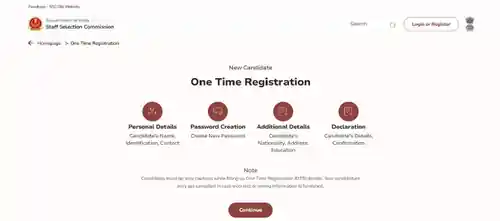
- In the small window that opens, click Register Now at the bottom. The One Time Registration page opens, showing the four parts: Personal Details, Password Creation, Additional Details and Declaration. Click Continue.
- Aadhaar (Sl. No. 1): choose whether you have an Aadhaar card. If yes, enter the Aadhaar number (or VID), verify it, tick the consent and click Send OTP to authenticate. If no, upload the proofs listed above.
- Name (Sl. No. 2): enter your name exactly as in your Class 10 certificate. If you changed your name after Class 10, fill Sl. No. 3a and 3b.
- Gender, DOB, Father’s and Mother’s name (Sl. No. 4 to 7): all exactly as in the Class 10 certificate. Critical fields are typed twice; a mismatch shows in red text.
- Class 10 details (Sl. No. 8 to 10): Education Board, Roll Number and Year of Passing. Sl. No. 11: highest educational qualification.
- Mobile and email (Sl. No. 12 and 13): give working ones; both are verified by OTP.
- Save the Basic Details and confirm the mobile number and email ID. Your Registration Number appears on screen, and the Registration Number and an auto-generated password are sent to your mobile and email.
Stage 2: Password Creation
- Log in with your Registration Number as the username and the auto-generated password.
- Change the password when prompted on first login.
- Log in again with the Registration Number and your new password. Your saved Basic Details are shown; edit if needed or click Next.
Stage 3: Additional Details
- Category (Sl. No. 1) and Nationality (Sl. No. 2). Sl. No. 3 is contact details for non-Indian nationals.
- Visible Identification Mark (Sl. No. 4).
- Benchmark disability, if any, with the Disability Certificate Number (Sl. No. 5).
- Permanent and Present Address (Sl. No. 6 and 7). Save and move to the last part.
Stage 4: Declaration and Final Submit
- Save, then print the draft Preview and check every field carefully.
- Click Final Submit. Two OTPs are sent, one to your mobile and one to your email; enter either one.
- Read the Declaration and click I Agree. Your OTR is complete. Note down the Registration Number and keep the preview.
The 14-day rule: SSC says that if you do not complete the registration within 14 days after submitting the Basic Information, your saved data is deleted and you have to start again.
Aadhaar Authentication in SSC OTR: Why It Helps
SSC made OTR Aadhaar-enabled for the 2025 exam cycle onwards (from 02.06.2025) and advises every candidate to opt for Aadhaar Based Authentication. The CHSL 2026 notice (para 9.3) lists the benefits:
- Applications of Aadhaar-authenticated candidates are not rejected because the photograph or signature does not meet the prescribed standard.
- They do not need to carry recent colour photographs or an original photo ID for entry to the Computer Based Examination.
- Candidates who could not undergo Aadhaar authentication must report two hours before the exam and carry at least two recent passport size colour photos and an original valid photo ID with the DOB as on the admit card (CHSL 2026 notice para 14.7).
- Visually impaired (VH) candidates are exempted from Aadhaar Face Authentication at the application stage (SSC notice 08.10.2025).
Keep your Aadhaar biometrics updated and unlocked. In its advisory of 17.11.2026, SSC told candidates to update their demographic and biometric details in Aadhaar and to keep biometrics permanently unlocked during the whole exam process, because a temporary UIDAI unlock lasts only 10 minutes. You can lock them again after the exam. If biometric authentication fails, SSC (notice 01.07.2025) asks you to update Aadhaar biometrics at the nearest Aadhaar centre. See our guide on SSC Aadhaar biometric unlock advisory and Aadhaar update status check.
Photo and Signature Rules (When You Apply After OTR)
You do not upload an old passport photo. The application form captures a live photograph through your camera. SSC instructions:
| Rule | What SSC says |
|---|---|
| Live photo | Good light, plain background, camera at eye level, look straight, full face inside the frame |
| Not allowed | Cap, mask, glasses/spectacles; a photo of an existing photograph (such applications are rejected) |
| No webcam? | Use the QR code under Upload Documents to install the SSC Android app and capture the photo on your phone |
| Signature | Scanned JPEG/JPG, 10 to 20 KB. Para 9.6 says about 6.0 cm x 2.0 cm; Annexure-IV says about 4.0 cm x 2.0 cm. Keep it clear and not miniature |
| Aadhaar-authenticated candidates | Not rejected on photo/signature standard grounds |
How to Edit or Correct SSC OTR Details
After login, the dashboard has a Modify Registration tab at the top left. In the application form, fields 1 to 18 come from your OTR and cannot be edited there; to change them you must use Modify Registration first. SSC has opened and closed the edit window several times by notice:
| SSC notice | What it allowed |
|---|---|
| 17.06.2025 | Correction window 19.06.2025 to 30.06.2025 (mainly OBC/EWS status and education) |
| 13.08.2025 / 26.08.2025 | Edit OTR open 14.08.2025 to 31.08.2025 |
| 08.10.2025 | Edit OTR facility available from 08.10.2025 onwards; VH candidates may bypass Aadhaar face authentication |
The CHSL 2026 notice still tells candidates to follow notice HQ-IT018/4/2024-IT dated 17.06.2025 for editing OTR. Edits must be genuine: SSC warns that changes made without proper justification will be treated as an attempt to mislead the Commission. Physical (paper) representations are not entertained; use the helpdesk.
Forgot SSC Registration Number or Password?
SSC says your registered mobile number and email ID are used to retrieve the password and Registration Number. On the Login window of ssc.gov.in use the recovery option and verify with the OTP sent to your registered mobile/email. Do not create a second OTR. If you no longer have access to the mobile or email, contact the SSC helpdesk.
Common SSC OTR Mistakes to Avoid
- Typing your name or DOB as in Aadhaar when it differs from the Class 10 certificate. SSC wants the Class 10 version; candidature can be cancelled for wrong details.
- Using a friend’s or cyber cafe mobile/email. All SSC communication goes only to the registered mobile and email.
- Leaving the OTR half done. Data is deleted after 14 days.
- Waiting for the last day of an exam form. SSC warns that the site gets heavy load near closing dates and it is not responsible if you cannot apply.
- Keeping Aadhaar biometrics locked on exam day.
- Making a second OTR when you forget the Registration Number.
Troubleshooting
| Problem | What to do |
|---|---|
| OTP not received | Check the number/email typed; wait and resend. Mobile and email must be working |
| Aadhaar authentication fails | Make sure Aadhaar details are updated; update biometrics at an Aadhaar centre (SSC notice 01.07.2025) |
| Red text on a field | The verify field does not match the first entry; retype both |
| Old ssc.nic.in Registration Number not working | Expected: register afresh on ssc.gov.in |
| Details wrong after final submit | Use Modify Registration when SSC keeps edit OTR open; for queries call 1800-309-3063 |
| Photo rejected/blurred | Retake live photo in good light without spectacles, or use the SSC Android app QR option |
FAQs
Q. What is SSC OTR?
A. OTR is One-Time Registration on the Staff Selection Commission website ssc.gov.in. You create it once, and your Registration Number and details are used to apply for every SSC exam on the new website.
Q. Is my old ssc.nic.in registration valid?
A. No. SSC says an OTR generated on the old website ssc.nic.in is not functional on the new website ssc.gov.in. Register again on ssc.gov.in.
Q. Is there any fee for SSC OTR?
A. SSC’s OTR procedure lists no fee. Exam fees (for example Rs 100 for CHSL 2026, with exemptions for women, SC, ST, PwBD and eligible ex-servicemen) are paid only when you apply for an exam.
Q. Is Aadhaar compulsory for SSC registration?
A. Aadhaar authentication is optional but strongly advised. Without it you must upload proofs of name, DOB, address and gender plus a photo, and carry photos and an original photo ID to the exam.
Q. How long do I have to complete SSC OTR?
A. 14 days from saving the Basic Details. After that the incomplete data is deleted.
Q. Can I change my name or DOB in SSC OTR?
A. Use Modify Registration on your dashboard when SSC allows edits. Name, DOB and parents’ names must match your Class 10 certificate; wrong details can cancel your candidature.
Q. Can I register for SSC on mobile?
A. Yes. SSC accepts applications on ssc.gov.in and through the my SSC mobile app from the Google Play Store.
Q. What is the SSC helpline number?
A. SSC helpdesk toll free number is 1800-309-3063 and the email is helpdesk-ssc@ssc.nic.in.
Official links
Always verify dates and fees on the official website before applying.
Source: Staff Selection Commission, Notice of Combined Higher Secondary (10+2) Level Examination, 2026 (07.09.2026), paras 9.1 to 9.6 and Annexure-III/IIIA/IV; SSC IT Section notices dated 17.06.2025, 01.07.2025, 13.08.2025, 26.08.2025 and 08.10.2025; SSC advisory dated 17.11.2026. Checked on 27 November 2026.
Get free job alerts
New govt, bank and teaching jobs, admit cards and results. No spam.