Last updated:
Spelling mistake in your name on the PAN card? Wrong date of birth, father’s name, or an old address? You do not need a new PAN. The Income Tax Department lets you correct the details on your existing PAN through a single online form, and you get a fresh PAN card with the same PAN number and the corrected details.
This guide covers the complete PAN card correction process online in 2026: which form to use (PAN CR-01 for individuals), the exact fee (₹66 to ₹107 in India), the paperless e-KYC route versus sending documents by post, which documents prove a name change after marriage, the photo and signature rules, processing time, status check, and the mistakes that get applications stuck. Every fee and rule below is taken from Protean’s official PAN pages (tinpan.proteantech.in), checked on 26 November 2026.
Official links
Always verify dates and fees on the official website before applying.
Quick answer: Open the Protean online PAN application page, choose “Changes or Correction in existing PAN Data / Reprint of PAN Card”, fill the form, tick the box on the left of each field you want corrected (name, father’s name, date of birth etc.), pay ₹66 (e-PAN only, paperless) or ₹101 (with physical card, paperless) and finish with Aadhaar e-KYC and e-Sign. If you choose the physical mode instead, post the signed acknowledgement with documents to Protean, Pune, within 15 days. Normal processing takes about two weeks.
PAN Card Correction 2026 at a Glance
| Item | Details |
|---|---|
| Form | PAN CR-01 (Individuals), PAN CR-02 (Non-individuals): “Request for New PAN Card or/and Changes or Correction in PAN Data” |
| Who can use it | Anyone who already has a PAN and wants to change/correct details or get a reprint |
| PAN number after correction | Same PAN; a new card with updated details is issued |
| Apply online at | Protean (onlineservices.proteantech.in) or UTIITSL, the two agencies authorised by the Income Tax Department |
| Fee (Indian address) | ₹66 e-PAN only (paperless) | ₹72 e-PAN only (physical documents) | ₹101 physical card (paperless) | ₹107 physical card (physical documents) |
| Fee (foreign address) | ₹1,011 (paperless) or ₹1,017 (physical documents) with physical card |
| e-Sign charge | ₹5.90 extra if e-KYC/e-Sign is selected |
| Documents deadline (physical mode) | Must reach Protean, Pune within 15 days of online application |
| Processing time | Normally about two weeks, if the application is in order |
| Helpline | 020-27218080 (7 AM to 11 PM, all days), WhatsApp 8096078080 |
What Can You Correct on a PAN Card?
The correction form lets you update almost every detail held in the Income Tax Department’s PAN database. The most common requests are:
- Name: spelling mistakes, missing middle name, initials expanded, or a full change of name (after marriage, by gazette notification etc.).
- Father’s name: wrong spelling or missing name.
- Date of birth: wrong day, month or year.
- Gender: including change of gender for transgender applicants.
- Photo and signature: an old or unclear photo or signature on the card.
- Address for communication, mobile number and email ID.
- Aadhaar details: for example, printing your name exactly as it appears in Aadhaar.
The same form is also used to get a reprint of a lost or damaged card when nothing needs to change, and (for individuals holding more than one PAN) to surrender the extra PAN. Remember that under Section 467 of the Income Tax Act, 2025, a penalty of ₹10,000 can be levied for holding more than one PAN, so never apply for a fresh PAN just to fix a mistake.
PAN Correction Fee 2026 (Official Protean Rates)
The fee depends on two choices you make in the form: whether you want a physical PAN card or only the e-PAN (PDF on email), and whether you finish the application paperless (Aadhaar e-KYC and e-Sign, or scanned e-Sign/DSC) or by posting physical documents.
| What you choose | Paperless (e-KYC / e-Sign / DSC) | Physical documents posted to Protean |
|---|---|---|
| Physical PAN card, Indian address | ₹101 | ₹107 |
| Physical PAN card, foreign address | ₹1,011 | ₹1,017 |
| e-PAN only (no physical card), email mandatory | ₹66 | ₹72 |
All amounts include taxes. An extra ₹5.90 is charged when you pick the e-KYC and/or e-Sign service. If you only need a reprint and nothing has to change, Protean’s separate reprint link costs ₹50 (Indian address) or ₹959 (foreign address), with no form or documents, provided your last PAN application was processed by Protean or the e-Filing portal.
Payment can be made by debit card, credit card or net banking. A demand draft (payable at Mumbai, in favour of “Protean – PAN”) is accepted only in the physical mode. For an individual, the card or net-banking payment can be made by you or an immediate family member.
How to Correct PAN Card Details Online: Step by Step
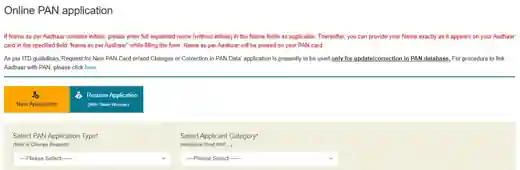
- Open the official Protean form page: onlineservices.proteantech.in/paam/endUserRegisterContact.html (linked in the box above).
- Under New Application, in “Select PAN Application Type”, choose Changes or Correction in existing PAN Data / Reprint of PAN Card (No changes in Existing PAN Data).
- Select the applicant category (Individual for most people), title, name, date of birth, email ID, mobile number and your existing PAN, then submit.
- A token number is shown on screen and sent to your email. Note it: you can save the form and resume later with this token using Resume Application.
- Choose how you will submit: e-KYC & e-Sign (paperless), e-Sign scanned based, or physical documents forwarded to Protean.
- Fill all mandatory fields (marked *). For each detail you want changed, tick the box in the left margin next to that field. Fields without a tick are not changed.
- Choose whether you want a physical PAN card or e-PAN only, then confirm the details on the preview screen. Fix any errors the form shows.
- Pay the fee online. An acknowledgement with a 15-digit number is displayed and also emailed to you along with the payment receipt.
- Paperless mode: complete Aadhaar OTP e-KYC and e-Sign. Nothing needs to be posted. Physical mode: print the acknowledgement, paste photos, sign, and post it with documents (see below).
Important: the address you give for communication in this form is updated in the Income Tax database even if you did not tick the address box, so enter your current address carefully.
Documents Required for PAN Correction
You need four kinds of proof: proof of your existing PAN (a copy of the PAN card or allotment letter), proof of identity, proof of address, proof of date of birth, plus proof supporting the change you asked for. In the paperless e-KYC route, your Aadhaar data is used and no papers are posted.
Accepted proofs for individuals (Indian citizens)
| Document | Identity | Address | Date of birth |
|---|---|---|---|
| Aadhaar card | Yes | Yes | No |
| Indian passport | Yes | Yes | Yes |
| Driving licence | Yes | Yes | Yes |
| Voter ID (EPIC) | Yes | Yes | Yes |
| Ration card with photo | Yes | No | No |
| Central/State Govt or PSU photo ID card | Yes | No | Yes |
| Electricity, water, landline/broadband bill or gas bill (not older than 3 months) | No | Yes | No |
| Bank, depository or credit card statement (not older than 3 months) | No | Yes | No |
| Domicile certificate | No | Yes | Yes |
| Birth certificate from municipal authority/Registrar of Births | No | No | Yes |
| Matriculation certificate or mark sheet | No | No | Yes |
| Marriage certificate | No | No | Yes |
| Pension payment order | No | No | Yes |
For a person born on or after 01.10.2023, a birth certificate is mandatory as proof of date of birth. Note that Aadhaar is not accepted as proof of date of birth in the PAN document list, so for a DOB correction keep a passport, birth certificate, 10th certificate or similar ready.
Proof needed for a name or father’s name change
| Applicant | Accepted document |
|---|---|
| Married women (change of name after marriage) | Marriage certificate, or marriage invitation card, or passport showing husband’s name, or gazette publication of name change, or certificate from a Gazetted Officer (for applicant’s name only) |
| Other individuals | Gazette publication of name change, or certificate from a Gazetted Officer (for applicant’s name only) |
| Transgender applicants (name/gender) | Transgender certificate issued by the District Magistrate |
| Companies | ROC certificate for name change |
| Firms / LLPs | Revised partnership deed or Registrar of Firms/LLP certificate |
| Trust / AOP / BOI / AJP / local authority | Revised deed/agreement or revised registration certificate |
Physical Mode: Photo, Signature and Posting Rules
If you did not finish with e-KYC/e-Sign, your application is processed only after Protean receives your papers. Follow these rules from the official guidelines exactly, because most rejections come from here:
- Paste two recent colour photographs (3.5 cm x 2.5 cm) in the boxes on the acknowledgement. Do not staple or clip them.
- Sign (or put a left thumb impression) across the left photo, so that part of the signature is on the photo and part on the form. Do not sign on the right-side photo.
- Keep the signature inside the box provided. A thumb impression must be attested by a Magistrate, Notary Public or Gazetted Officer under official seal.
- Attach proof of existing PAN, identity, address, date of birth and the proof for the change. If you gave your Aadhaar number, attach a copy of Aadhaar.
- Write on the envelope: “APPLICATION FOR PAN — N- followed by your 15-digit acknowledgement number”.
- Send it to: Income Tax PAN Services Unit, Protean eGov Technologies Limited, 4th Floor, Sapphire Chambers, Baner Road, Baner, Pune – 411045. It must reach within 15 days of applying online.
Paperless vs Physical Mode: Which Should You Pick?
| Point | Paperless (e-KYC + e-Sign) | Physical documents |
|---|---|---|
| Documents to post | None | Signed acknowledgement + proofs by post |
| Fee (physical card, India) | ₹101 + ₹5.90 e-Sign | ₹107 |
| Needs | Aadhaar with mobile linked for OTP, details matching Aadhaar | Photos, printer, courier/post |
| Best for | Corrections where your Aadhaar already has the correct name/DOB | Cases where Aadhaar itself is wrong, or name change by gazette/marriage proof |
| Speed | Faster, no postal delay | Starts only after papers reach Pune |
Tip: if the mistake is also in your Aadhaar, correct Aadhaar first (see our Aadhaar name/DOB update guide). Otherwise the e-KYC route will copy the same wrong detail, and a PAN-Aadhaar name mismatch can later cause linking failures.
How to Check PAN Correction Status
- Go to Protean’s Know Status of PAN Application page (button on the top of the online application page).
- Select the PAN application type, enter the 15-digit acknowledgement number and the captcha.
- You will see whether the application is under process, dispatched, or has a discrepancy. Protean also sends status updates by email/SMS.
- After approval, the e-PAN PDF arrives on your email, and the physical card (if chosen) is posted to your communication address.
Lost the acknowledgement? Use the “Regenerate ack receipt” link on the Protean PAN page (separate links for applications made from 16 July 2016 onwards and before).
Common Problems and How to Fix Them
| Problem | What to do |
|---|---|
| Name in Aadhaar has initials | Enter the full expanded name in the name fields, then type the name exactly as in Aadhaar in the separate “Name as per Aadhaar” field. The Aadhaar name is printed on the card. |
| Forgot to tick the left-margin box | That field will not change. Apply again and tick the right boxes. |
| Documents did not reach in 15 days | The application is not processed; contact the call centre with your acknowledgement number. |
| DOB proof rejected | Aadhaar is not valid DOB proof for PAN. Use passport, birth certificate, 10th certificate, driving licence or voter ID. |
| Two PANs found | Use the same form to surrender the extra PAN (mention it in the form). Keep only one PAN. |
| e-KYC OTP not coming | Mobile is not linked with Aadhaar. Update it at an Aadhaar centre or use the physical mode. |
Related PAN Guides on NaukriWatch
- New PAN card apply online (Form 93)
- Instant e-PAN download
- PAN-Aadhaar link status and fee
- Verify PAN status (operative or inoperative)
FAQs
Q. Will my PAN number change after correction?
A. No. A new card is issued with the same PAN and the corrected details. Only the details change.
Q. What is the PAN correction fee in 2026?
A. For an Indian address: ₹66 for e-PAN only and ₹101 with a physical card in the paperless mode; ₹72 and ₹107 in the physical-document mode. Add ₹5.90 if you use e-KYC/e-Sign.
Q. Can I correct my PAN card date of birth online?
A. Yes. Tick the date of birth box in the correction form and give a valid DOB proof such as a birth certificate, passport, 10th certificate, driving licence or voter ID. Aadhaar is not listed as DOB proof for PAN.
Q. How do I change my surname on PAN after marriage?
A. Apply through the correction form, tick the name box and attach a marriage certificate, marriage invitation card, passport with husband’s name, gazette notification or Gazetted Officer certificate.
Q. How long does PAN correction take?
A. Protean says normally about two weeks to process and dispatch, provided the application is complete. In the physical mode the clock starts after your papers reach Pune.
Q. Do I need to post any documents?
A. Not in the paperless e-KYC and e-Sign mode. In the physical mode, the signed acknowledgement with photos and proofs must reach Protean, Pune within 15 days.
Q. Can I get only a reprint of my PAN card without changes?
A. Yes. Use Protean’s reprint link (₹50 for an Indian address) if your last application was processed by Protean or the e-Filing portal, or use the correction form without ticking any box.
Q. Which form number is used for PAN correction?
A. PAN CR-01 for individuals and PAN CR-02 for non-individuals, titled “Request for New PAN Card or/and Changes or Correction in PAN Data”.
Source: Protean eGov Technologies (Income Tax PAN Services Unit) official pages: PAN services index, Change/Correction guidelines and Documents Required list on tinpan.proteantech.in, checked 26 November 2026. NaukriWatch is not a government website; apply only on the official Protean or UTIITSL portals.
Official links
Always verify dates and fees on the official website before applying.
Get free job alerts
New govt, bank and teaching jobs, admit cards and results. No spam.