Last updated:
Need the Form I & XIV of your land in Goa? The Directorate of Settlement and Land Records (DSLR), Government of Goa, lets anyone view the Record of Rights (RoR) of any survey number for free on its official website, dslr.goa.gov.in. You pick the district, taluka, village, survey number and subdivision, type a captcha, and the Form I & XIV (or Form D for city survey areas) opens as a PDF. No login and no fee are needed for this information copy.
This guide explains, step by step, how to check Goa Bhulekh Form I & XIV online, the new three-district list (North Goa, South Goa and the new Kushavati district), how to check mutation status, where to see the land map (plan), and how to get an official certified copy through Goa Online. Every screen here was checked on the official DSLR and Goa Online websites on 26 November 2026.
Official links
Always verify dates and fees on the official website before applying.
Quick answer: Open dslr.goa.gov.in, click Land Records (RoR), keep Form I and XIV selected, choose District > Taluka > Village > Survey Number > Subdivision Number, type the captcha and click View Details. The record opens as a PDF. It is for information only; for an official copy apply on goaonline.gov.in and pay the fee.
Goa Land Records Online at a Glance
| Item | Details |
|---|---|
| Official website | dslr.goa.gov.in (Directorate of Settlement & Land Records, Government of Goa, hosted by NIC Goa) |
| Record name | Form I & XIV (Record of Rights for village land); Form D (city survey property record); Non Promulgated records |
| Districts on the portal | Kushavati, North Goa, South Goa (checked 26 Nov 2026) |
| Search fields | District, Taluka, Village, Survey Number, Subdivision Number + captcha |
| Login needed? | No |
| Fee to view | Free (information copy) |
| Official / certified copy | Through Goa Online (Form 1 and 14 / Form D service) after payment, or at taluka Mamlatdar / ISLR offices |
| Other online services | Mutation status, partition and mutation notices, maps (plans), Property Register (via Goa Online) |
| Law | Goa Land Revenue Code, 1968 |
Goa Districts and Talukas on the Land Records Portal
Goa now has three districts on the DSLR portal. The new Kushavati district was carved out of South Goa, so the talukas of Canacona, Dharbandora, Quepem and Sanguem now sit under Kushavati in the drop-down. If you cannot find your taluka under South Goa, select Kushavati.
| District (as on portal) | Talukas listed (26 Nov 2026) |
|---|---|
| North Goa | Bardez, Bicholim, Pernem, Sattari, Tiswadi |
| South Goa | Mormugao, Ponda, Salcete |
| Kushavati | Canacona, Dharbandora, Quepem, Sanguem |
How to Check Form I & XIV Online in Goa (Free)
- Open the official website dslr.goa.gov.in. In the green menu bar at the top, click Land Records (RoR).
- The page “View Record of Rights Information…” opens. Keep the radio button on Form I and XIV for village land. Choose Form D for property in a city survey area, or Non Promulgated if your village records are not yet promulgated.
- Select your District (Kushavati, North Goa or South Goa). The page reloads and fills the Taluka list.
- Select the Taluka, then the Village. The survey numbers of that village load in the next box.
- Select the Survey Number and then the Subdivision Number of your plot (as written on your sale deed or old Form I & XIV).
- Type the captcha shown in the orange box. If you cannot read it, click Can’t Read? for a new one.
- Click View Details. The Form I & XIV opens as a PDF. Use the browser’s save or download option to keep a copy. Click Clear to search another plot.
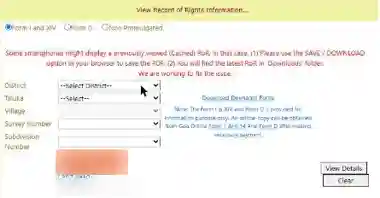
Smartphone tip from the portal: the DSLR page warns that some smartphones may show a previously viewed (cached) RoR. If that happens, use the browser’s SAVE / DOWNLOAD option to save the PDF; the latest RoR will be in your phone’s Downloads folder. The page also links a Download Devnagiri Fonts option in case Marathi/Konkani text does not display correctly.
What Form I & XIV Shows
Form I & XIV is the basic record of rights for agricultural and other land in Goa’s villages. It is prepared and updated under the Goa Land Revenue Code, 1968. A typical Form I & XIV shows:
- Village, taluka, survey number and subdivision number of the plot.
- Area of the plot and the class or use of the land, with land revenue (assessment) details.
- Name of the occupant (owner) and of any tenant or other right holder, with the mutation numbers by which names were entered.
- Encumbrances or remarks noted on the record, if any.
- Crop and cultivation details for the plot (the Form XIV part).
Form D is the matching record for land and buildings in towns where a city survey has been done (the property is identified by chalta and P.T. sheet numbers instead of a survey number). The search flow is the same; only the record type changes.
Free Online Copy vs Official Certified Copy
The DSLR page clearly says: the Form I & XIV and Form D are provided for information purpose only. An official copy can be obtained from Goa Online (Form 1 and 14 and Form D) after making the necessary payment. So the free PDF is fine to check ownership and area, but banks, courts, the Sub-Registrar and government offices ask for the official copy.
| Copy type | Use it for | Cost / access |
|---|---|---|
| Free view on dslr.goa.gov.in | Checking owner name, area, survey number before a deal; quick reference | Free, no login |
| Official copy on goaonline.gov.in | Bank loan, sale/registration, court case, building permission, government schemes | Fee shown on Goa Online before payment; download after issue |
| Copy at Mamlatdar / ISLR office | If you cannot apply online; any taluka office can issue the RoR of any village (offices are networked) | Office fee as applicable |
The DSLR citizen’s charter notes that computerised certified copies of Form I & XIV and Form D can be issued from any taluka-level Mamlatdar office and ISLR office in the state, because all taluka offices are networked. Computerised certified copies of plans and maps are usually ready in one to three days, depending on the plan.
How to Get the Official Form I & XIV on Goa Online
- Open goaonline.gov.in and register (first-time users) or log in with your user ID.
- Go to the services list and choose the Form I & XIV (or Form D) service of the Revenue / land records department.
- Enter the district, taluka, village, survey number and subdivision, exactly as on the free RoR.
- Pay the fee online. The amount is shown before payment.
- Download the official copy from your Goa Online account when it is issued.
Note: Goa Online posted a notice that all services depending on Form I & XIV / Form D would be unavailable from 24 November 2026, 4:00 PM to 25 November 2026, 6:00 PM, because of a DSLR data migration. If the service gives an error, check the notice ticker on the Goa Online home page and try again after the stated time.
How to Check Mutation Status in Goa Online
After a sale, gift, partition or inheritance, the new owner’s name is entered in Form I & XIV through a mutation case at the Mamlatdar office. You can follow the case on the DSLR site:
- On dslr.goa.gov.in, click Mutation Status in the top menu.
- Choose Form I and XIV or Form D.
- Select the District and Taluka.
- Enter the Mutation Number (from your mutation application receipt), type the captcha and click View Status.
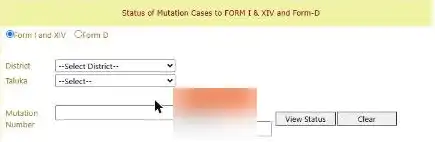
Mutation and partition cases are also published as public notices so that anyone with an objection can come forward. The top menu has Notices (Partition), Notices (Mutation) and Public Notices (Mutation). Check these if you are buying land, to see whether any pending case touches the plot.
Goa Land Map (Plan) and Property Register
- Maps: the Maps menu on dslr.goa.gov.in opens a search with district, taluka, village, survey number and subdivision (plus captcha) for the survey plan of the plot. DSLR has computerised 100% of Goa’s cadastral maps.
- Property Register: the Property Register link takes you to Goa Online department services.
- Survey services: DSLR also handles partition, re-survey, demarcation or re-fixing of boundaries, land conversion, certified copies of village maps and old Alvara/title/cadastral and communidade plans, and confirmation of possession in city survey areas.
DSLR Citizen Service Centres
For survey and map services you can visit the DSLR citizen service centres listed on the official site: Margao, Quepem, Canacona, Ponda and Mapusa. The head office is the Directorate of Settlement & Land Records, Swami Vivekanand Road, Panaji (near Military Headquarters).
Common Problems and Fixes
| Problem | What to do |
|---|---|
| Taluka not in South Goa list | Select Kushavati; Canacona, Dharbandora, Quepem and Sanguem moved there |
| Survey number not listed | Check the village name (some villages have similar names), or try Non Promulgated / Form D |
| Old record shows on phone | Clear cache or use SAVE / DOWNLOAD; the latest RoR lands in Downloads |
| Marathi text looks broken | Use the Download Devnagiri Fonts link on the RoR page |
| Captcha fails | Click Can’t Read? for a new captcha; type it exactly, case-sensitive |
| Name not changed after sale | Check Mutation Status with your mutation number; contact the Mamlatdar office if it is stuck |
| Goa Online service error | Look for a downtime notice on the Goa Online home page and retry later |
Important Points
- Viewing Form I & XIV on dslr.goa.gov.in is free. Do not pay any agent or website for the free view.
- Only dslr.goa.gov.in and goaonline.gov.in are official. NaukriWatch is an information website, not a government portal.
- The free RoR does not prove that the land has no loan or court case. Before buying, also check registration records, pending mutation/partition notices, and take legal advice.
- Always match the survey and subdivision number with your documents before applying for an official copy.
Looking for another state? See our land records guide for all states, which links every state portal and our step-by-step guides.
FAQs
Q. How can I check Form I & XIV online in Goa?
A. Open dslr.goa.gov.in, click Land Records (RoR), select Form I and XIV, choose district, taluka, village, survey number and subdivision, type the captcha and click View Details.
Q. Is Goa Form I & XIV free online?
A. Yes, viewing it on the DSLR website is free and needs no login. It is for information only.
Q. How do I get an official Form I & XIV in Goa?
A. Apply on goaonline.gov.in for the Form 1 and 14 service and pay the fee, or get it from any taluka Mamlatdar or ISLR office.
Q. Which district is my taluka in now?
A. North Goa: Bardez, Bicholim, Pernem, Sattari, Tiswadi. South Goa: Mormugao, Ponda, Salcete. Kushavati: Canacona, Dharbandora, Quepem, Sanguem.
Q. What is Form D in Goa?
A. Form D is the property record for land and buildings in city survey areas. Select Form D on the same RoR page.
Q. How do I check mutation status in Goa?
A. Click Mutation Status on dslr.goa.gov.in, choose Form I and XIV or Form D, select district and taluka, enter the mutation number and captcha, and click View Status.
Q. Can I see the land map of my plot in Goa?
A. Yes. Use the Maps menu on dslr.goa.gov.in and search by district, taluka, village, survey number and subdivision.
Q. Why does my phone show an old Form I & XIV?
A. Some phones show a cached copy. Use the browser save/download option; the latest RoR is saved in Downloads.
Source: Directorate of Settlement & Land Records, Goa (dslr.goa.gov.in): Land Records (RoR), Mutation Status, Maps and Services pages and the DSLR Citizen’s Charter; Goa Online (goaonline.gov.in) home page notice. Checked on 26 November 2026.
Official links
Always verify dates and fees on the official website before applying.
Get free job alerts
New govt, bank and teaching jobs, admit cards and results. No spam.