Last updated:
Official links
Always verify dates and fees on the official website before applying.
Buying a flat in Ahmedabad, a plot in Surat or farm land near Rajkot? In Gujarat, every sale deed, gift deed, mortgage and other document is registered through Garvi 2.0, the online system of the Inspector General of Registration (IGR), Revenue Department. The name stands for Automation of Administration of Registration, Valuation and Indexing in Gujarat. You can fill the deed details from home, pay stamp duty and registration fee online, book a time slot, check the jantri (market value) rate and get Index-2 or EC copies. This guide explains the full process in simple words, based on the official Garvi 2.0 portal, its stamp duty and registration fee calculators and the department's citizen help manual, all checked on 27 November 2026.
Quick answer: Gujarat property registration online (Garvi 2.0)
Open the official Garvi 2.0 portal (garvi.gujarat.gov.in), go to Registration > Citizen Application, create a citizen login, then choose Pre-Registration for Document. Enter the document type, seller, buyer, identifier and property details, pick the Sub Registrar office, and pay the registration fee and stamp duty through Cyber Treasury (net banking, card, BHIM UPI or NEFT). Print the fee receipt, book an appointment slot (Save Token), and visit the Sub Registrar with the document on your slot. The official calculators show stamp duty of Rs 1,47,000 (4.9%) and a registration fee of Rs 30,000 (1%) on a Rs 30 lakh sale deed.
Garvi 2.0 Gujarat at a glance
| Item | Details |
|---|---|
| Official portal | garvi.gujarat.gov.in (Garvi 2.0) |
| Department | Inspector General of Registration and Superintendent of Stamps, Revenue Department, Govt of Gujarat |
| Online services | e-Registration, e-Stamping, property valuation (jantri), slot availability, certified Index-2, EC and document copy (IORA), Christian marriage certified copy |
| Payment | Cyber Treasury: net banking, debit/credit card, BHIM UPI, NEFT |
| Stamp duty on sale deed (calculator) | Rs 1,47,000 on Rs 30 lakh = 4.9% |
| Registration fee on sale deed (calculator) | Rs 30,000 on Rs 30 lakh = 1% |
| OTP / alerts | Through the NIC SANDES app, as advised on the portal |
| Help desk | (079) 23277200 |
| Head office | Stamp and Registration Bhavan, KH-5, Sector-14, Gandhinagar 382016; phone (079) 23288575 |
Latest notice on the portal: all Sub Registrar offices were closed on 09-11-2026 for a public holiday, and the department says all Sub Registrar offices will work as usual on 28-11-2026 (Saturday).
Services you can use on Garvi 2.0
| Service | What it does |
|---|---|
| E-Registration | Fill and submit document details online before the registry visit |
| E-Stamping | Buy stamp duty digitally; the portal also lists e-stamping centres and stamp vendors |
| Property Valuation / Jantri | See jantri (annual statement of rates) district-wise and calculate market value |
| Calculate Stamp Duty | Select the article (deed type), enter market value and consideration |
| Find Registration Fee | Select the article and enter the consideration amount |
| Slot Availability / View Appointment | See free time slots at Sub Registrar offices |
| Index-2 details | View Index-2 information of a registered document (for information only) |
| IORA certified copies | Apply online for certified Index-2, EC and document copies |
| Download Document | Download the scanned registered document |
| Model Draft and Forms | Sample deed drafts, input sheet, Form 1 and Form 3 |
| E-Mortgage | Separate e-Mortgage portal (emortgage.gujarat.gov.in) linked from the menu |
Step-by-step: register property online on Garvi 2.0
These steps follow the department's citizen help manual, Public Data Entry Flow, published on the portal:
Step 1: Create a citizen login
- Open garvi.gujarat.gov.in and click Registration > Citizen Application, or go straight to the Citizen Login page.
- Click Create New User. Choose the type of person (individual, advocate and so on), enter first, middle and last name, address, email ID, mobile number, ID proof type and number, then pick a user name and password, fill the captcha and click Save.
- Log in with the user name, password and captcha. An OTP comes to your mobile; the portal advises using the NIC SANDES app for OTP alerts.
Step 2: Start a new registration application
- On the Service Dashboard, click Pre-Registration for Document. The dashboard also has Application and Defect Registration Fee Payment.
- Select New Registration Application, read the disclaimer and instructions, tick I Agree and continue.
- Primary details: choose the language of the document (English or Gujarati), nature of document and sub-nature, date of execution, and the number of executing parties (sellers), claiming parties (buyers), confirming parties and witnesses. Click Save & Continue. You can add only as many people as you enter here.
Step 3: Add parties and property
- Enter the executing party (seller) details and save. For more than one seller, click NEW and add each one.
- Then enter the claiming party (buyer) details, followed by the identifier who will identify the sellers at the office.
- Preview all parties. Use EDIT or DELETE to fix a mistake. If you missed a person, go back to the primary details step and increase the number.
- Click NEXT and enter property details: property type, district, taluka, village, purpose, survey or block number, and construction details. Preview and edit if needed.
Step 4: Choose office, presenter and payer
- Select the Sub Registrar office. The portal shows the office or offices whose area covers the property.
- Select the presenter (the party who will present the document) and enter an email ID. The email is mandatory because document status updates are sent there.
- Select the payer. This name is printed on the e-challan.
- Enter the consideration amount, the market value (for deeds such as gift or exchange where the fee is charged on market value), the number of document pages and endorsement pages (at least 5), and save.
Step 5: Pay registration fee and stamp duty
- Paying the registration fee is compulsory online; stamp duty can be paid here too. Check the amounts, accept the terms and click Confirm.
- You are taken to the Cyber Treasury portal of the Finance Department. Pay by net banking, or choose the payment gateway for debit/credit card, BHIM UPI or NEFT (SBIePay).
- View and print the fee receipt. Carry it with the document to the Sub Registrar office.
Step 6: Book an appointment and visit the office
- Pick a date and an available time slot and click Save Token.
- Click Print Appointment Schedule and take the print.
- Visit the Sub Registrar office on your slot with the original document, the fee receipt and the appointment print, along with all parties, the identifier and their ID proofs. The Sub Registrar then completes the registration.
Stamp duty and registration fee in Gujarat
Garvi 2.0 has two public calculators that anyone can use without login: Calculate Stamp Duty and Find Registration Fee. We tested both on 27 November 2026 with a sample value of Rs 30,00,000:
| Article (deed type) | Value entered | Stamp duty shown | Registration fee shown |
|---|---|---|---|
| 20(a) Conveyance (sale) of immovable property | Rs 30,00,000 | Rs 1,47,000 (4.9%) | Rs 30,000 (1%) |
| 28 Gift | Market value Rs 30,00,000 | Rs 1,47,000 (4.9%) | Check with Find Registration Fee |
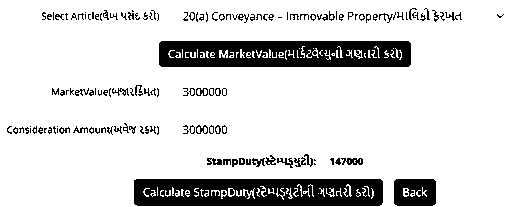
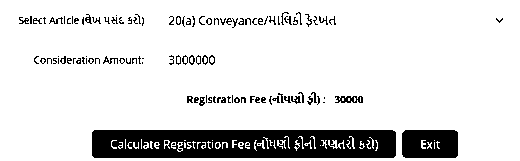
The stamp duty calculator asks for both the market value (jantri based) and the consideration amount, because duty is charged on whichever applies under the Gujarat Stamp Act. Use Calculate MarketValue on the same page if you do not know the jantri value. The portal notes that for any further details you should contact the concerned Sub Registrar office, so treat the calculator as a guide and confirm before paying, especially for family gift deeds or other concessions notified by the state.
Example: total cost for a Rs 30 lakh flat
| Item | Amount |
|---|---|
| Stamp duty (calculator) | Rs 1,47,000 |
| Registration fee (calculator) | Rs 30,000 |
| Approximate total paid to government | Rs 1,77,000 |
Jantri rate: how to check market value
Under Online services > Jantry rate, the portal lists the Annual Statement of Rates (jantri) district-wise for all districts from Ahmedabad to Valsad, along with the Jantri Guideline 2023. The home page also links the Draft Jantri Guideline 2024. Jantri rates are used to work out the market value for stamp duty, so check the rate for your village or ward before fixing the deal value.
Index-2, EC and certified copies
- Index-2 details (online view): on the Index-2 Details page, select district, Sub Registrar office and year, enter the document number, applicant name and mobile number, fill the captcha and verify with the code sent to your mobile. The portal says this view is for information only and is not an official copy.
- Certified Index-2, EC and document copy: apply online through IORA (Online certified Index-2 and document copy) or the Garvi citizen login (certified EC). Offline certified Index-2, EC, search and document copy requests are also made through the citizen login.
- Download Document: use this link on the home page to download the scanned copy of a registered document.
Documents to keep ready
- The drafted document (you can start from the Model Draft on the portal), with page count and endorsement pages.
- ID proof of every seller, buyer and the identifier (you enter the ID type and number in the application).
- Property details: district, taluka, village, survey or block number, and construction details.
- Mobile number and email ID for OTP and status updates.
- Net banking, card or UPI for Cyber Treasury payment.
- Print of the fee receipt and the appointment schedule.
Common problems and fixes
| Problem | What to do |
|---|---|
| OTP not received | Install the NIC SANDES app as advised on the portal, or wait and resend. |
| Forgot to add a seller or buyer | Go back to primary details, increase the number of parties, then add the person. |
| Wrong party or property details | Use EDIT or DELETE on the preview screen before payment. |
| Office asks for more registration fee | Use Defect Registration Fee Payment on the Service Dashboard. |
| Need status of the document | Status is sent to the presenter's email ID; keep it correct. |
| Calculator amount differs at office | Contact the Sub Registrar office; concessions or valuation can change the final duty. |
FAQs
Q. What is Garvi 2.0 Gujarat?
A. It is the official online system of the Inspector General of Registration, Gujarat, at garvi.gujarat.gov.in, for registering documents, paying stamp duty and registration fee, checking jantri and getting Index-2, EC and document copies.
Q. How much is stamp duty on property in Gujarat?
A. The official Garvi stamp duty calculator showed Rs 1,47,000 on a Rs 30 lakh conveyance (sale) deed, which is 4.9%. Confirm your case with the calculator or Sub Registrar office.
Q. What is the registration fee in Gujarat?
A. The Find Registration Fee calculator showed Rs 30,000 on a Rs 30 lakh conveyance deed, which is 1%.
Q. Can I complete property registration fully online in Gujarat?
A. No. You fill details, pay fees and book a slot online, but the parties must visit the Sub Registrar office on the appointment date to complete registration.
Q. How do I pay stamp duty online in Gujarat?
A. Through Cyber Treasury from the Garvi application, using net banking, debit or credit card, BHIM UPI or NEFT. e-Stamping is also available.
Q. How can I see Index-2 online in Gujarat?
A. Use Index-2 Details on garvi.gujarat.gov.in with district, office, year, document number, name, mobile and OTP. For a certified copy, apply through IORA.
Q. Where can I check jantri rates in Gujarat?
A. Under Online services, Jantry rate, on garvi.gujarat.gov.in, which lists the annual statement of rates district-wise with the 2023 guideline.
Q. Is email mandatory in the Garvi application?
A. Yes. The presenter's email ID is mandatory, because document status details are sent to it.
Official links
Always verify dates and fees on the official website before applying.
Source: Garvi 2.0 portal (garvi.gujarat.gov.in), Inspector General of Registration, Government of Gujarat: home page and notices, Stamp Duty Calculator and Registration Fee Calculator (tested with Rs 30 lakh), Index-2 Details, Jantry Rate page and the Garvi 2.0 help manual for registration of document (Public Data Entry Flow). Checked on 27 November 2026. Rates change by notification; always confirm on the portal before paying.
Get free job alerts
New govt, bank and teaching jobs, admit cards and results. No spam.