Last updated:
Official links
Always verify dates and fees on the official website before applying.
Buying a flat in Vijayawada, taking a home loan in Visakhapatnam or checking a plot in your village before you pay an advance? The first document every lawyer and bank asks for is the Encumbrance Certificate (EC), the official list of every registered transaction on that property. In Andhra Pradesh you no longer need to stand in a Sub Registrar Office queue for it. This guide walks you through both online routes on the official IGRS AP portal (registration.ap.gov.in): the free information-only EC and the digitally signed EC, with the official fees, the search options, the payment steps and what to do when the portal says “Data Not Found”. Everything below was checked on the department's own pages on 27 November 2026.
Quick answer: how to get an EC online in Andhra Pradesh
Open registration.ap.gov.in > EC & CC Services. For a free check, click EC For Information Only, choose the search type, enter the document number, year of registration and Sub Registrar Office (SRO), type the captcha and submit. For a digitally signed EC that banks and courts accept, click Signed EC, log in to CARD PRIMME with your email, mobile or Aadhaar and OTP, raise a New Encumbrance Request, pay online through CFMS, click Verify Payment the same day, and download the e-signed PDF from your dashboard once the SRO approves it. Online EC covers transactions from 01-01-1983; for older periods go to the SRO.
AP EC online at a glance
| Item | Details |
|---|---|
| Official portal | registration.ap.gov.in (Registration & Stamps Department, Govt of Andhra Pradesh) |
| Free self-search | EC For Information Only (registration.ec.ap.gov.in/ecSearch), no login, captcha only |
| Digitally signed EC | Signed EC via CARD PRIMME login (email / mobile / Aadhaar + OTP) |
| Period covered online | Transactions registered on or after 01-01-1983 |
| Before 1983 | Apply at the concerned Sub Registrar Office (SRO) |
| Official EC fee | Rs 200 per certificate (search up to 30 years), Rs 500 (more than 30 years) |
| Payment | Online through CFMS (net banking, debit/credit card, UPI) |
| Who issues signed EC | Concerned Sub Registrar, after e-sign |
| Helpdesk | 14544 (department help desk), IT helpdesk +91 9121106359 |
| Anti-bribe line | 14400 |
What is an Encumbrance Certificate and why you need it
An Encumbrance Certificate is a statement, prepared from the Sub Registrar's registers, that lists every registered document affecting a property during the period you ask for: sale deeds, gift and settlement deeds, mortgages, deposit of title deeds, releases, partitions, agreements of sale and so on. If no document was registered in that period, the statement says so (often called a “Nil EC”).
You will usually need an EC when you:
- buy a house, flat or plot and want to confirm the seller really owns it and has not mortgaged or sold it to someone else,
- apply for a home loan or loan against property (banks insist on a 13 to 30 year EC),
- apply for mutation, a building plan or a property tax change,
- settle a family property or a court case,
- sell your own property and the buyer's lawyer asks for it.
The IGRS AP portal itself states that the self-search EC and the EC obtained at the SRO come from the same source data, so for practical purposes both are the same. A bank or court that wants a signed copy will ask for the digitally signed EC (or an ink-signed one from the SRO).
Two online options: Information-only EC vs Signed EC
| Feature | EC For Information Only | Signed EC |
|---|---|---|
| Purpose | Your own checking before a deal | Bank loan, court, official use |
| Login | Not needed | CARD PRIMME login with OTP |
| Fee | Free | Official EC fee + user charges, paid online |
| Output | On-screen statement | Digitally signed PDF in your dashboard |
| Who approves | Instant, system generated | Concerned Sub Registrar accepts and e-signs |
| Time | Immediate | After payment is verified and SRO completes e-sign |

Method 1: Free EC search (EC For Information Only)
Use this to check a property yourself before you pay anything.
- Open the official portal registration.ap.gov.in and click EC & CC Services in the top menu (or “EC Search” under Services).
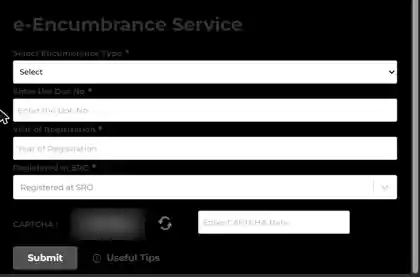
- On the EC & CC Service page, click the tile EC For Information Only. It opens the e-Encumbrance Service page.
- In Select Encumbrance Type, choose the search type (Document No is the most reliable).
- Enter the Document Number and the Year of Registration exactly as printed on the registered deed.
- Select the SRO in Registered at SRO (the office where the deed was registered).
- Type the captcha and click Submit.
- From the results, pick the correct property row and generate the statement of encumbrances. Note every document number, date, nature (sale, mortgage etc.) and party names.
Search options allowed by the portal
The e-Encumbrance page lists three ways to search:
- Document Number and Year of the registered document,
- House Number / Old House Number / Apartment name in a city, town or village, with optional flat number and colony, locality or habitation,
- Survey Number in a revenue village, optionally with a plot number.
District and SRO selection is mandatory in every option, and the period of search depends on the data available for that SRO. For house numbers, the department advises the standard format Ward – Block – Door No / Bi No for better results.
Why you may see several matching results
Old property descriptions were not written in one standard format, and the same property may have been described differently over the years. So the portal runs a probabilistic search and may show multiple rows, some unrelated. Choose only the entry whose village, survey or door number and document details match your deed.
Method 2: Digitally signed EC online (Signed EC)
The steps below follow the department's official EC citizen user manual (2024) and the live login page.
Step 1: Log in to CARD PRIMME
- On the EC & CC Service page click Signed EC. It opens the CARD PRIMME (Public Data Entry) EC login page.
- Choose Email ID, Mobile Number, Aadhaar Number or Tidco, enter it and click Get OTP.
- Enter the OTP and click Login. First-time users click New Registration and create an account.
- After login you see tiles: Public Data Entry, EC Search, Certified Copy, MV Assistance and Stamp Indent. Click EC Search.
Step 2: Raise a New Encumbrance Request
- On the EC dashboard click New Encumbrance Request.
- Select the encumbrance type, enter the Document No, Year of Registration and the SRO, type the captcha and click Submit.
- The matching property appears with SRO, jurisdiction, schedule number, village code, city/village, ward-block, colony, apartment, flat, house number, survey number and plot number. Check it and click Next.
- The request form shows the registered district, SRO, document number, year and village. Fill the Applicant Name, add an alias village name if any, optionally choose up to 2 more SROs to also search, and set the Period of Search From / To.
- Type the captcha and click Submit. A message confirms “EC request has been created successfully”.
Step 3: Pay online through CFMS
- Back on the dashboard, your request shows the status Payment Required. Click the payment action.
- The Other Receipts (EC, CC & Other Miscellaneous Fee) Payment Service page opens with the Department Transaction ID, DDO code, your name, mobile, email and the amounts (registration fee, user charges and stamp duty charges). Note the Department Transaction ID and click Submit.
- Choose Online Payment and a payment gateway, then pay by net banking, debit/credit card or UPI.
- After a successful payment, click the return link. The acknowledgement page shows the CFMS Transaction ID, Department Transaction ID and Bank Transaction ID. Print or save it.
Step 4: Verify payment and download the signed EC
- Return to the EC dashboard and click Verify Payment against your request. Do this the same day.
- Once verified, the request is assigned to the concerned Sub Registrar, who accepts it and generates the EC statement.
- When the SRO completes the e-sign process, the EC report appears in your dashboard as a PDF. Click to download it.
Important rules from the official manual
- EC is not an auto-generated report: a Sub Registrar checks and signs it.
- Payment must be made after you submit the request, and then verified with the Verify Payment link.
- EC requests are not approved if payment is not completed or validated (Verify Payment) within the same day.
- The final report is shown in your dashboard only after the SRO completes the e-sign process.
AP EC fee and certified copy fee (official)
The fee for EC and certified copies is fixed in the Table of Fees under Section 78 of the Registration Act, 1908, notified by G.O.Ms.No. 463, Revenue (Regn-I) Department, dated 17.08.2013 (in force from 01.09.2013), which is the fee order published on the IGRS AP website.
| Service | Fee |
|---|---|
| Conducting search and issue of Encumbrance Certificate, up to 30 years | Rs 200 per certificate |
| Conducting search and issue of Encumbrance Certificate, more than 30 years | Rs 500 per certificate |
| Conducting search and issue of certified copy | Rs 200 per certificate |
On the online signed EC, the CFMS payment page also adds user charges and stamp duty charges as applicable, so the total shown on your screen can be higher than the base fee. In the department's own sample screens a request showed a registration fee of Rs 200, user charges of Rs 100 and stamp duty charges of Rs 20 (total Rs 320). Always pay the amount the portal calculates for your request. Bank charges depend on the payment mode; the gateway shows them before you pay (UPI was shown with nil charges).
Registration fee in Andhra Pradesh (for reference)
If your EC check is part of a property purchase, these are the registration fee rates in the same official Table of Fees (G.O.Ms.No. 463 of 2013). Stamp duty and transfer duty are charged separately, and rates are revised from time to time, so confirm your final figure with the official Duty Fee Calculator before you buy stamps.
| Document | Registration fee |
|---|---|
| Sale / Conveyance | 0.5% |
| Gift, Settlement, Release | 0.5% (min Rs 1,000, max Rs 10,000) |
| Exchange | 0.5% |
| Agreement of Sale cum GPA | Rs 2,000 |
| Development Agreement cum GPA | 0.5% (max Rs 20,000) |
| Lease, Licence, Mortgage | 0.1% |
| Deposit of Title Deeds | 0.1% (max Rs 10,000) |
| Release of Deposit of Title Deeds | Rs 1,000 |
| Partition, Cancellation, Rectification | Rs 1,000 |
| Registration on a holiday | Rs 5,000 |
| Other documents not covered | Rs 500 per document |
The IGRS AP home page (checked 27.11.2026) currently shows, for a gift deed: stamp duty 2% on market value, registration fee 0.5% (minimum Rs 1,000, maximum Rs 10,000) and user charges of Rs 100 if the value is up to Rs 50,000 and Rs 200 above that.
Other free checks to do before you buy property in AP
| Check | What it tells you | Where |
|---|---|---|
| Prohibited Property Search | Whether the land is in the government's prohibited properties list (such land cannot be registered) | registration.ap.gov.in > Prohibited Properties |
| Property Value | Official market value of the land/flat used for stamp duty | registration.ap.gov.in > Property Value |
| Market Value Guidelines | Rules for valuing land and structures | Values & Rates > Market Value Guidelines |
| Find SRO | Which Sub Registrar Office covers your village or locality | registration.ap.gov.in > Find SRO |
| CFMS Challan status | Whether a challan you paid is valid before you go to the SRO | Check/Verify CFMS Challan |
| Slot booking | Book a registration slot instead of waiting at the SRO | Slot Booking Service |
The portal's live statistics for 2026-27 (checked 27.11.2026) show 14,68,140 registrations so far this financial year, an average of 2.25 hours per registration and 1,97,558 auto mutations.
EC for transactions before 1983 or ink-signed EC
Online eEC covers only transactions registered on or after 01-01-1983. For an earlier period, or if your bank or court insists on an ink-signed certificate, apply at the concerned SRO. The department publishes an Encumbrance application form on its Downloads page; fill the property schedule and period, attach a copy of the deed if you have one and pay the fee at the office.

Troubleshooting
| Problem | What to do |
|---|---|
| “Data Not Found” | The property description did not match the SRO data, or the record is not digitised. Try the document number search, check the SRO and year, and if it still fails, confirm at the SRO (as the portal itself advises). |
| Many unrelated results | Search is probabilistic. Use document number + year, or the exact survey / door number in Ward-Block-Door No format. |
| Payment done but request still shows Payment Required | Click Verify Payment on the dashboard the same day. Keep your CFMS and bank transaction IDs. |
| Request not approved | Requests are rejected if payment is not completed or verified the same day. Raise a fresh request and verify payment immediately. |
| Need EC before 1983 | Not available online. Apply at the SRO. |
| OTP not received | Use Resend OTP, or log in with another option (email / mobile / Aadhaar). |
| Middleman asking money | Use the official help desk 14544. To report a bribe demand, dial 14400. |
FAQs
Q. Is the free AP EC online valid for a bank loan?
A. The information-only EC is meant for your own checking. Most banks ask for the digitally signed EC (Signed EC) or an ink-signed EC from the SRO. Both come from the same source data, as the portal states.
Q. What is the official fee for EC in Andhra Pradesh?
A. As per G.O.Ms.No. 463 (2013) published on registration.ap.gov.in, the EC fee is Rs 200 per certificate for a search up to 30 years and Rs 500 for more than 30 years. User charges are added on the online CFMS payment page.
Q. Can I search EC by survey number in AP?
A. Yes. The e-Encumbrance page allows search by document number and year, by house/door or apartment details, or by survey number in a revenue village (optionally with plot number). District and SRO are mandatory.
Q. How long does it take to get a signed EC?
A. There is no fixed time printed on the portal. The EC is generated after you verify your payment, the Sub Registrar accepts the request and completes the e-sign. Verify payment on the same day, or the request will not be approved.
Q. Can I get EC for the years before 1983 online?
A. No. The portal says online eEC is available only for transactions after 01-01-1983. For earlier years, apply at the concerned SRO.
Q. Which login do I need for Signed EC?
A. The CARD PRIMME login, using your Email ID, Mobile Number, Aadhaar Number or Tidco ID with an OTP. New users click New Registration.
Q. How do I get a certified copy of a registered deed in AP?
A. On the same EC & CC Service page, use Signed CC (CARD PRIMME > Certified Copy). The official fee for search and issue of a certified copy is Rs 200 per certificate.
Q. Whom do I contact for problems with IGRS AP?
A. The department help desk is 14544 and the IT helpdesk number shown on the EC pages is +91 9121106359. Report bribe demands on 14400.
Official links
Always verify dates and fees on the official website before applying.
Source: Registration & Stamps Department, Government of Andhra Pradesh: registration.ap.gov.in home page, EC & CC Service page, e-Encumbrance Service page, CARD PRIMME EC login, EC Citizen User Manual (2024) and G.O.Ms.No. 463 dated 17.08.2013 (Table of Fees). Checked on 27 November 2026. Fees and procedures can change; confirm on the official portal before paying.
Get free job alerts
New govt, bank and teaching jobs, admit cards and results. No spam.