Last updated:
Official links
Always verify dates and fees on the official website before applying.
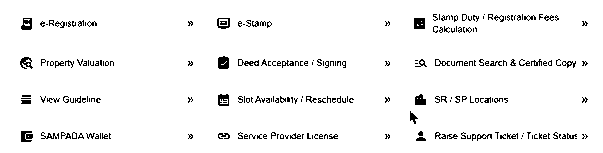
Buying a plot in Indore, a flat in Bhopal or farm land in your village? In Madhya Pradesh every sale, gift, mortgage and most other property deeds are now registered on SAMPADA 2.0, the state's e-registry system run by the Department of Registration and Stamps (IGRS MP). You can calculate stamp duty, check the guideline value, buy an e-stamp, draft the deed, do video KYC and even get a document registered without visiting the Sub Registrar office in some cases. This guide explains every step in plain language, with the prerequisites, charges, refund rules and the certified copy process, all taken from the official SAMPADA 2.0 FAQs and portal pages checked on 27 November 2026.
Quick answer: how to register property online in MP (Sampada 2.0)
Register on the official SAMPADA 2.0 portal (sampada.mpigr.gov.in) with Aadhaar or PAN e-KYC, start e-Registration, add buyer/seller details, pick the property by its unique ID (Land Parcel ID / ULPIN for farm land, Property Tax Register ID for urban or rural houses) and its geo-tagged photo from the SAMPADA app, let the system calculate stamp duty and registration fee, draft the deed, pay through Cyber Treasury, then complete e-KYC/e-sign and either visit the Sub Registrar on your booked slot or use faceless Video KYC where allowed. The registered deed is delivered as a digitally signed soft copy (no hard copy). A certified copy costs Rs 300 and searching documents is free.
SAMPADA 2.0 at a glance
| Item | Details |
|---|---|
| Official portal | sampada.mpigr.gov.in (IGRS, Department of Registration and Stamps, Govt of MP) |
| What it does | e-Registration, e-Stamp, duty calculation, property valuation, guideline rates, document search and certified copy |
| Launched | SAMPADA since 2015; version 2.0 launched in 2024 |
| Login / KYC | Aadhaar or PAN e-KYC; Aadhaar OTP or video KYC |
| Payment | Online through MP Cyber Treasury; SAMPADA Wallet for one-click payment |
| Deed delivery | Digitally signed soft copy only, no hard copy |
| Certified copy fee | Rs 300 per document (search is free) |
| Certified copy validity | 1 year from generation |
| Slot booking | First booking free; one reschedule before token free |
| Mobile app | SAMPADA 2.0 app (Android and iOS) for geo-tagging |
| Help desk | 0755-2780133, or raise a ticket on the portal |
Who needs to use SAMPADA 2.0
Anyone who wants a document registered in Madhya Pradesh: buyers and sellers of land, houses and flats, people making a gift or settlement deed, borrowers registering a mortgage, and anyone who needs an e-stamp for an agreement or an affidavit. Under the department's own definition, e-Registration covers documents related to movable or immovable property, such as sale, gift and loan, with drafting, signing, payment, presentation and admission of execution all done electronically.
Prerequisites for e-registration (official list)
Keep these ready before you start. The list is from the SAMPADA 2.0 e-Registry FAQ:
- A valid and active Aadhaar or PAN for e-KYC of every party.
- The unique ID of the property: Land Parcel ID for agricultural land, or the Property Tax Register (PTR) ID of the urban or rural local body.
- A mobile number of each party.
- A smartphone with the SAMPADA mobile app to take the geo-tagged photo of the property.
- An Aadhaar biometric device (fingerprint or iris) or a digital signature dongle.
- A web camera for video KYC in faceless mode.
- PAN card for transactions above Rs 5 lakh, or Form 60/61.
The 8 stages of e-Registry on SAMPADA 2.0
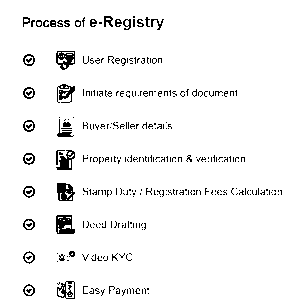
The portal shows the e-Registry process in eight stages. The property selection stage applies only when immovable property is involved.
| Stage | Name | What happens |
|---|---|---|
| 1 | User Registration | Create your SAMPADA account with Aadhaar/PAN e-KYC (full eKYC or partial registration). |
| 2 | Initiate requirements of document | Choose the deed type and document/instrument (sale, gift, mortgage etc.). |
| 3 | Buyer/Seller details | Add every party and witness with mobile number for e-KYC. |
| 4 | Property identification and verification | Select the property by its ID; data comes from the custodian department (CLR, UADD or PNRD) and is pinned on the GIS map. |
| 5 | Stamp Duty / Registration Fee calculation | System calculates duty and fee for the selected instrument, with any exemption you are eligible for. |
| 6 | Deed Drafting | Draft the deed online or use a model deed; parties approve it. |
| 7 | Video KYC | Faceless video KYC (interactive or non-interactive) where the instrument allows, or eKYC at the Sub Registrar office. |
| 8 | Easy Payment | Pay duty and fees online through Cyber Treasury or the SAMPADA Wallet. |
Step by step: register a property deed online in MP
- Open sampada.mpigr.gov.in and click Register. Complete e-KYC with Aadhaar OTP (or PAN) and create your login.
- Check the official value first with Property Valuation and View Guideline (no login needed).
- Log in and click e-Registration. Select the deed and document/instrument.
- Add buyer, seller and witness details with each person's mobile number.
- Search the property by Agriculture Land ID, Municipal Property ID, Panchayat Property ID, address or SAMPADA Geo Tag ID. Enter ULPIN, Land Parcel ID, Pre-Mutation ID, E-Nagar Palika ID, PTR ID or Swamitva ID as asked. If the custodian department has no exact location, pin the property on the map yourself.
- Upload or link the geo-tagged photos taken in the SAMPADA mobile app (pin the property, click three angled photos and save to get a Geo Tag ID).
- Let the system calculate stamp duty and registration fee. Claim any exemption you are eligible for.
- Draft the deed (or use a model deed) and send it to the parties for approval.
- Pay the duty and fees online through MP Cyber Treasury, or from your SAMPADA Wallet.
- Complete identification: book a slot and visit the Sub Registrar for biometric eKYC and admission of execution, or complete faceless video KYC through the link sent on SMS, email or WhatsApp if your instrument allows it.
- After the Sub Registrar approves, the registered document is delivered electronically as a digitally signed soft copy. Download and keep it safe.
Faceless registration: video KYC rules
SAMPADA 2.0 offers two faceless modes. The portal shows the option only if the selected document type allows it.
| Point | Non-Interactive Video KYC | Interactive Video KYC |
|---|---|---|
| How it works | You record a video (self photo, liveliness check, read a statement, capture document photo) without a live officer | Live video call with the Sub Registrar, who asks questions and marks parties recognised or not |
| Who can use | Instrument must allow it; property data must come from CLR/UADD/PNRD; all parties registered via Aadhaar e-KYC; not more than 10 parties | Same conditions |
| Documents | Aadhaar plus PAN / driving licence / voter ID / passport | Valid ID (Aadhaar, PAN, voter ID, passport) |
| Authentication | Aadhaar OTP after submitting the video | Aadhaar OTP during the call |
| Outcome | Submission confirmed on screen | Sub Registrar decides: proceed, hold, return, refuse, impound or cancel; you get SMS, email and WhatsApp |
For both, use a stable, well-lit place, a phone or computer with camera and microphone, a secure network, and allow camera, microphone and location permissions when asked.
Stamp duty and registration fee in MP: how they are calculated
The FAQ explains that the charges depend on the deed type and instrument, and points users to the duty chart and the Stamp Duty / Registration Fees Calculation tool, which anyone can use without logging in. Select the deed and instrument, click Submit, enter the consideration, secured, premium or loan amount and add the property, claim any exemption, then click Duty Calculate. You can print the result.
The stamp duty shown can have four parts, as defined in the SAMPADA FAQ:
| Component | Meaning |
|---|---|
| Principal Stamp Duty | The basic state stamp duty on the instrument |
| Municipal Duty | Levied for municipal (urban local body) areas |
| Janpad Duty | Levied for Janpad Panchayat (block level) areas |
| Upkar Duty | An additional duty (upkar) levied by the government |
Registration fee is separate from stamp duty. Because rates differ by instrument and location and are revised by notification, use the official calculator for your exact figure on the day you register rather than any fixed percentage quoted online. If a licensed service provider helps you, they may charge their own fee per registration.
Guideline value (collector rate) in MP
The guideline value is the minimum value at which a property can be registered, and it is used to calculate stamp duty and registration fees. On SAMPADA 2.0 click View Guideline:
- Draft Guideline: choose financial year, district, district office, SRO, area type, local body/village and ward/village colony, then Search. You can view, download and post suggestions on the draft.
- Published Guideline: click your district name to download the PDF for the current financial year.
- Guideline Rates: choose zone, district, SRO, area type, local body/tehsil and ward/village colony, or pin the spot on the map, then click View Guideline Rate.
Slot booking charges
| Action | Charge |
|---|---|
| First slot booking | Free |
| One reschedule before token generation | Free |
| Further rescheduling | May incur charges |
| Reschedule after token generation | Additional charges |
e-Stamp on SAMPADA 2.0
Any registered user can generate an e-stamp for self or on behalf of others. There are two types: Judicial (court affidavits, petitions, suits) and Non-Judicial (registration of documents and transactions). The steps are: log in, click E-Stamp, initiate, select document, add party details, pay, draft the deed, get approval from parties, e-sign, and the e-stamp is generated. The FAQ lists Aadhaar e-KYC of the party and a DSC for e-sign as prerequisites. Charges depend on the instrument; check them in duty calculation.
Document search and certified copy (Rs 300)
- Register on SAMPADA 2.0 (full eKYC or partial registration) and log in.
- Click Search & Certified Copy (Document Search/Certified Copy).
- Search using the registration number or other details. Searching is free.
- Select the document and pay the fee of Rs 300.
- After successful payment the certified copy becomes available. Invoices are under View Orders > Order History.
A certified copy is valid for one year from generation. Anyone can check if a copy is genuine at the official Verify Certified Copy page, and the home page has a Validate Document box for e-registered documents, e-stamps and certified copy numbers.
SAMPADA Wallet, payments and refunds
- The SAMPADA Wallet holds a prepaid credit limit for instant payment of registration fees, e-stamp fees and other services. Categories include e-stamp non-judicial, registration fee and other services, e-stamp judicial, and mutation-fee wallets for CLR (RCMS) and Panchayat & Rural Development.
- Recharge: log in > Payment module > choose the wallet > enter amount > pay online.
- Failed transactions are reconciled by MP Treasury, which can take up to 7 days.
- Payment deducted but status “pending”: open the order or Payment > Treasury Transactions, choose “pending”, click Show Details and then Check Payment Status.
- Refunds: stamp duty is refundable under Sections 49 to 55 of the Indian Stamp Act, 1899 when the document is not registered or the stamp is unused. Registration fee is refundable in some cases under Rule 120 of the MP Registration Rules, 1939, within 3 months if not used.
Troubleshooting
| Problem | What to do |
|---|---|
| Property not found by ID | Try another search option (address or Geo Tag ID) or pin the property manually on the map. |
| Faceless option not shown | Your instrument may not allow it, property data may be missing from the custodian department, a party may lack Aadhaar e-KYC, or there are more than 10 parties. Book a slot at the SRO instead. |
| Payment deducted, status pending | Use Check Payment Status under Treasury Transactions; failed amounts can take up to 7 days to return. |
| Paid for certified copy but not generated | Raise a ticket at the portal with document number and payment details. |
| Need a paper copy of the registered deed | SAMPADA 2.0 gives only a digitally signed soft copy; print it, or obtain a certified copy (Rs 300). |
| Any other issue | Call the help desk 0755-2780133 or use Raise Support Ticket / Ticket Status. |
FAQs
Q. What is SAMPADA 2.0?
A. It is Madhya Pradesh's official e-registry system (Stamps and Management of Property and Documents Application) for registering documents, generating e-stamps, calculating duty and getting certified copies. SAMPADA started in 2015 and version 2.0 was launched in 2024.
Q. Can I register property in MP without going to the registry office?
A. For certain documents, yes. Faceless registration with video KYC is offered only where the instrument allows it, property data is available from the custodian department, all parties have Aadhaar e-KYC and there are not more than 10 parties.
Q. What documents are needed for e-registry in MP?
A. Aadhaar or PAN of every party, the property's unique ID (Land Parcel ID or PTR ID), mobile numbers, a geo-tagged photo from the SAMPADA app, biometric device or DSC, a webcam for video KYC, and PAN or Form 60/61 for transactions above Rs 5 lakh.
Q. How do I calculate stamp duty in MP?
A. Use Stamp Duty / Registration Fees Calculation on sampada.mpigr.gov.in. Select the deed and instrument, enter the amount and property, claim exemptions and click Duty Calculate. No login is needed.
Q. What is the fee for a certified copy on SAMPADA?
A. Rs 300 per document. Searching registered documents is free, and the certified copy is valid for one year.
Q. Will I get the original registered deed on paper?
A. No. SAMPADA 2.0 delivers registered documents electronically as digitally signed soft copies; no hard copies are given.
Q. How long does a failed payment take to come back?
A. According to the SAMPADA FAQ, MP Treasury can take up to 7 days to reconcile failed transactions.
Q. Is slot booking free?
A. Yes, the first booking is free and one reschedule before token generation is free. More reschedules, or rescheduling after the token, can attract charges.
Official links
Always verify dates and fees on the official website before applying.
Source: SAMPADA 2.0 portal (sampada.mpigr.gov.in), Department of Registration and Stamps, Government of Madhya Pradesh: home page, e-Registry, Duty Calculation, Property Valuation, Guideline, Video KYC, Payment, e-Stamp and Search & Certified Copy FAQs. Checked on 27 November 2026. Rates change by notification; always confirm on the portal before paying.
Get free job alerts
New govt, bank and teaching jobs, admit cards and results. No spam.