Last updated:
Buying a flat or plot in Maharashtra and want to know who sold it before, when, and for how much? The Department of Registration and Stamps (IGR Maharashtra) lets anyone search registered property transactions online and open the Index-II extract of each registered document, free, through its eSearch service. It is one of the simplest checks you can do before paying a token amount.
This guide explains what Index-II is, how to use the free eSearch 1.9 portal by property details (survey/CTS/gat/plot number) or by document number, the three search areas (Mumbai, Rest of Maharashtra, Urban Areas), what is not shown, the difference between free and paid eSearch, and how to get a certified copy for legal use. Checked on the official IGR portals on 26 November 2026.
Official links
Always verify dates and fees on the official website before applying.
Quick answer: Open freesearchigrservice.maharashtra.gov.in, choose Property Details, pick Mumbai / Rest of Maharashtra / Urban Areas, then select the Year, District, Tahsil and Village, enter the survey, CTS, gat, milkat or plot number (numbers only), type the captcha and click Search. In the results, click IndexII to open the extract. The free search covers registrations from 1985 onwards (fuller for Mumbai) and is for information only; certified copies come from the Sub Registrar Office.
IGR Maharashtra eSearch at a Glance
| Item | Details |
|---|---|
| Department | Department of Registration and Stamps (IGR), Government of Maharashtra, Pune |
| Free service | eSearch 1.9 (freesearchigrservice.maharashtra.gov.in) |
| Paid service | eSearch paid (esearchigr.maharashtra.gov.in), separate login, search fee + download fee |
| Search methods | By Property Details, or by Document Number |
| Areas | Mumbai; Rest of Maharashtra; Urban Areas in Rest of Maharashtra |
| Data period | From 1985 onwards (all physically available SR data for Mumbai city and suburb; 1985-2002 for selected offices elsewhere) |
| Report you get | Index-II as per the nature of document |
| Not shown | Power of attorney and will deeds |
| Update speed | Registration data is updated in real time (as per the portal) |
| Legal value | Information only; certified copy from the Sub Registrar Office |
What Is Index-II?
Every document registered at a Sub Registrar Office (SRO) in Maharashtra, such as a sale deed, agreement for sale, gift deed, mortgage or lease, is entered in the office’s index registers. Index-II is the property-wise extract of that entry. It usually shows the type of document, the property description (village, survey/CTS number, area, flat details), the consideration (price) and market value, stamp duty and registration fee paid, the names of the parties, the document number and the date of registration.
Banks ask for Index-II while giving home loans, housing societies ask for it when transferring a flat, and buyers use it to confirm that the seller really bought the property and that no other sale or mortgage is registered on it.
How to Search Index-II Free by Property Details (Step by Step)
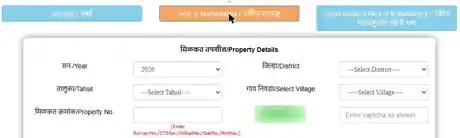
- Open the official free eSearch portal: freesearchigrservice.maharashtra.gov.in (also linked as “Free search 1.9” on igrmaharashtra.gov.in). Close the “Search Flow” popup.
- Keep the मिळकत निहाय / Property Details tab selected.
- Click the area: Mumbai, Rest of Maharashtra, or Urban Areas in Rest of Maharashtra (cities outside Mumbai, like Pune, Thane or Nagpur municipal areas).
- Select the Year of registration you want to search (2026 back to 1985). Search year by year if you do not know when the deed was registered.
- Select the District. For Rest of Maharashtra, then select the Tahsil and Village. For Mumbai, type at least one letter of the village/area in English and pick it from the list.
- Enter the Property No.: survey number, CTS number, milkat number, gat number or plot number. Only numbers are allowed.
- Type the captcha shown and click शोध / Search. Results can take a few minutes.
- In the result list, click the IndexII button against a document. The extract opens in a new window (allow pop-ups). Save or print it for reference.
- To run another search, click रद्द / Cancel first. If the buttons stay disabled, close the browser and open the site again.
Village not appearing in the list? The portal’s own guide says to try other English spellings, for example Daadar instead of Dadar, Maazgaon instead of Mazgaon, Aambivali instead of Ambivali. The portal also allows a name-based search after a property number is entered.
How to Search by Document Number
If you already have the registration (document) number from a sale deed or receipt, this is the fastest route:
- Click the दस्त निहाय / Document Number tab.
- Select the Registration Type: eFiling, eRegistration, Regular or iSarita 2.0. Most deeds registered at an SRO counter are “Regular” (or iSarita 2.0 for offices that have moved to it).
- Select the District, then the Sub Registrar Office (SRO) where the document was registered, for example “Haveli 21”.
- Select the Year, enter the Document Number, type the captcha and click Search.
- Click IndexII in the result to view the extract.
Free eSearch vs Paid eSearch
| Point | Free eSearch 1.9 | Paid eSearch |
|---|---|---|
| Website | freesearchigrservice.maharashtra.gov.in | esearchigr.maharashtra.gov.in |
| Login | Not needed for the search screens | User ID and password (separate account; free users cannot use paid) |
| Fee | Free | Search fee, plus download fee for documents, paid online on the portal |
| What you get | Index-II extract of registered documents | Search across records and download copies of registered documents (Mumbai: digitally signed copies) |
| Use at SRO | – | Search fee paid online also covers the same physical search at the SRO |
| Legal status | Information only | Information only; not a certified copy or ownership certificate |
The department states clearly that data and documents taken from eSearch are not certified and are not an ownership certificate. For a certified copy of a document or Index-II, or for a formal search of records (title search), apply at the concerned Sub Registrar Office. The application forms (Certified Copy of Document, Certified Copy of Index, Application for Search) and process notes are on igrmaharashtra.gov.in under Copy and Search.
Property Checks Before Buying: Where Index-II Fits
| Check | Where | What it tells you |
|---|---|---|
| Past sale deeds / mortgages | IGR eSearch (Index-II) | Who bought and sold, when, at what price; any registered mortgage or lease |
| Ownership in revenue records | 7/12 utara and 8A (Mahabhumi) | Current owner name, area, crops, encumbrance entries (rural land) |
| Plot location on map | Maha Bhu Naksha | Shape and position of the survey/gat number |
| Bank charges on the property | CERSAI search (link on eSearch page) | Security interest registered by banks/NBFCs |
| Court cases | eCourts district portal (link on eSearch page) | Pending suits on the property or parties |
The portal itself advises checking eSearch just before a transaction to prevent fraud, because new registrations appear in real time.
Common Problems and Fixes
| Problem | Fix |
|---|---|
| No records found | Try other years; try the survey number vs CTS number; check you chose the right area tab (Mumbai / Rest / Urban). |
| Village not in dropdown | Try alternate English spellings (Daadar, Maazgaon, Aambivali). |
| Search button disabled after a result | Click Cancel; if still disabled, close the browser and reopen the site. |
| IndexII does not open | Allow pop-ups for the site; it opens in a new window and may take a few minutes. |
| Power of attorney or will not found | These are not shown in eSearch results; ask the SRO. |
| Old deed (before 2002) missing | 1985-2002 data is online only for selected offices; apply for a physical search at the SRO. |
FAQs
Q. Is IGR Maharashtra Index 2 search free?
A. Yes. eSearch 1.9 at freesearchigrservice.maharashtra.gov.in shows Index-II extracts free. Downloading full documents through the paid eSearch portal needs a search fee and download fee.
Q. From which year is property data available?
A. From 1985 onwards. For Mumbai city and suburb all physically available SR data from 1985 is online; elsewhere 1985-2002 data is available for selected offices.
Q. Can I search by owner name?
A. The search starts with the property number; the portal says a name-based search is also available after entering the property number.
Q. Is the online Index-II valid for a bank loan?
A. It is for information. Banks and courts usually want a certified copy from the Sub Registrar Office; ask your bank which copy it accepts.
Q. Which documents are not shown in eSearch?
A. Power of attorney and will deeds.
Q. Do I need separate accounts for free and paid eSearch?
A. Yes. The user guide says both need separate registration; free eSearch users cannot use the paid version with the same account.
Q. What is the difference between Index-I and Index-II?
A. Index-II is the property-wise extract that buyers and banks use; it lists the property, price, parties and registration details of a document. eSearch gives Index-II as per the nature of document.
Source: IGR Maharashtra (igrmaharashtra.gov.in: Copy and Search, Fee Structure pages), free eSearch 1.9 portal with its User Guide and FAQ, and the paid eSearch login instructions, checked 26 November 2026. NaukriWatch is not a government website.
Official links
Always verify dates and fees on the official website before applying.
Get free job alerts
New govt, bank and teaching jobs, admit cards and results. No spam.