Last updated:
Buying a site, flat or farm land in Karnataka, or taking a home loan? The bank and your lawyer will first ask for an Encumbrance Certificate (EC) and often a Certified Copy (CC) of the sale deed. In Karnataka both are issued online on Kaveri Online Services (Kaveri 2.0), the portal of the Department of Stamps and Registration. You apply from home, sign with Aadhaar e-Sign, pay online and download the digitally signed certificate. No office visit is needed.
This guide explains what an EC shows (and what it does not), how to register on Kaveri 2.0, how to apply for an EC step by step for property after and before 1 April 2004, the exact fee, the Sakala time limit, the EC formats (Form 15, 16 and 17), how to get a certified copy of a registered deed, and fixes for common problems such as a “Nil EC” for a property that was sold. All facts are from the official Kaveri 2.0 FAQs and portal, checked on 26 November 2026.
Official links
Always verify dates and fees on the official website before applying.
Quick answer: Register on kaveri.karnataka.gov.in (name, gender, mobile, email; password comes by SMS/email) > log in > Start application > Encumbrance Certificate (EC) > enter district, taluk, hobli, village and the survey/hissa or khata/property number, plus the search period > Aadhaar e-Sign (Form 22) > pay online when asked > download the signed EC. Fee: Rs 10 application + Rs 30 for the first year + Rs 10 for each extra year. Time limit under Sakala: 3 working days for EC from 1 April 2004.
Karnataka EC and CC at a Glance
| Item | Details |
|---|---|
| Department | Department of Stamps and Registration, Government of Karnataka |
| Portal | Kaveri Online Services (Kaveri 2.0), kaveri.karnataka.gov.in |
| EC fee | Application Rs 10 + search Rs 30 (1st year) + Rs 10 for every subsequent year |
| CC fee | Application Rs 10 + search Rs 30 + stamp duty Rs 10 + copying Rs 10 per page |
| Time limit (Sakala) | EC from 01.04.2004: 3 working days; EC before 2004: 10 working days for the first 13 years, plus 1 day per extra 10 years; CC: 3 working days |
| Signature | Aadhaar e-Sign on Form 22 (mandatory; Aadhaar number needed) |
| Payment | Online only: net banking, debit/credit card, UPI. Manual payment not accepted |
| EC formats | Form 15 (EC), Form 16 (Nil EC), Form 17 (search by name of executant) |
| Office visit | Not needed; signed EC/CC downloads in your login |
| Helpline | Kaveri helpdesk 8970200100, helpdsr@karnataka.gov.in; grievance 080-68265316 |
What Is an Encumbrance Certificate?
In the department’s own words, an Encumbrance Certificate is “a record showing registered transactions pertaining to a property”. It lists every deed registered at a Sub Registrar office for that property in the period you search: sale deeds, mortgages, gift deeds, partition deeds, releases and so on. Banks use it to check that the seller really owns the property and that it is not already mortgaged.
What an EC does NOT show
- Only documents registered in Book 1 (non-testamentary documents relating to immovable property) appear.
- Wills and authorities to adopt (Book 3) and Powers of Attorney (Book 4) are not reflected in an EC.
- Pending court cases on the property are not reflected.
- Unregistered agreements, revenue mutations and tax dues are not part of an EC. For land ownership in revenue records, check the RTC (pahani) on Bhoomi; see our Karnataka Bhoomi RTC guide.
EC Formats: Form 15, Form 16 and Form 17
| Form | Name | When it is issued |
|---|---|---|
| Form 15 | Encumbrance Certificate | Search by property details; registered transactions found |
| Form 16 | Nil Encumbrance Certificate | Search by property details; no registered transaction in the period |
| Form 17 | EC by name | Search made on the name of the executant |
A Nil EC means no deed was registered for that property in the period searched, so there are no registered transactions or liabilities for that time. If you get a Nil EC for a property you know was sold, your search details were probably incomplete (see the troubleshooting section below).
How to Register on Kaveri 2.0 (First-Time Users)
- Open kaveri.karnataka.gov.in (it opens the landing page) and click Register at the top right.
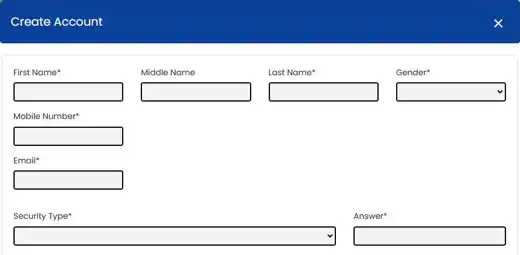
- In “Create Account” fill first name, middle name (optional), last name, gender, mobile number and email.
- Choose a security question type and answer, type the captcha text and submit.
- An auto-generated password is sent to your registered mobile number / email. Log in with it.
- To change the password later: profile/account icon (top right) > Change password.
How to Apply for an Encumbrance Certificate Online in Karnataka
Before you start, keep ready: district, taluk, hobli/town and village of the property; the survey number, surnoc and hissa number (agricultural land) or the property number type and number such as PID, site number, assessment number or khata number (non-agricultural property); the period you want searched; your Aadhaar-linked mobile for e-Sign; and a UPI, card or net banking account.
- Log in to Kaveri 2.0 and click Start application, then choose Encumbrance Certificate (EC).
- Choose the search basis: search by property number (usual) or search by party name.
- Select district, taluk, hobli/town and village.
- Enter property details. Agricultural: survey number, surnoc and hissa number (area in acres, guntas and cents). Non-agricultural: property number type and the present property number; use Add more to add extra numbers and narrow the search.
- Optional: tick “Use experimental map feature” to locate agricultural land on the GIS map and drop a pin on it.
- Enter the Period of EC search: From date and To date (day/month/year).
- Submit. The application is generated as Form 22; sign it with Aadhaar e-Sign (mandatory).
- The Sub Registrar office staff (SR, FDA or SDA) verify it. When you get the payment notification, pay online by net banking, card or UPI.
- After the department digitally signs the EC, a download option appears in your login. Open the PDF in Adobe Reader to see the valid digital signature.
EC for Property Before 1 April 2004
The standard online EC on Kaveri covers the period from 1 April 2004 to date. For an earlier period the official FAQ says you can still apply in Kaveri 2.0: select the EC service, fill the details and the EC period, e-Sign the application and submit it to the Sub Registrar. That search takes longer (see the Sakala timeline above). The FAQ also mentions the traditional offline route: an application to the concerned Sub Registrar in the format of Form No. 22. Once the fee is paid, the pre-2004 EC is downloadable from your applicant dashboard.
Karnataka EC Fee: How It Is Calculated
The official fee is Rs 10 application fee plus a search fee of Rs 30 for the first year and Rs 10 for every subsequent year of the search period. Examples worked out from that rule:
| Search period | Calculation | Total |
|---|---|---|
| 1 year | Rs 10 + Rs 30 | Rs 40 |
| 5 years | Rs 10 + Rs 30 + (4 x Rs 10) | Rs 80 |
| 13 years | Rs 10 + Rs 30 + (12 x Rs 10) | Rs 160 |
| 20 years | Rs 10 + Rs 30 + (19 x Rs 10) | Rs 230 |
| 30 years | Rs 10 + Rs 30 + (29 x Rs 10) | Rs 330 |
How many years you need depends on your bank or lawyer, so ask them before you apply, because the fee is charged per year searched.
How to Get a Certified Copy (CC) of a Registered Deed
A certified copy is an official copy of a registered document, such as your sale deed, which banks and the Income Tax department rely on. On Kaveri 2.0:
- Keep ready the district, SRO name, financial year and document number of the registration.
- Log in > Start application > Certified Copy (CC) and fill the details. Form 22 is generated after you submit.
- e-Sign with Aadhaar (mandatory). One application gives one CC; each needs its own e-Sign and payment.
- After the Sub Registrar accepts it, pay online. Fee: Rs 10 application + Rs 30 search + Rs 10 stamp duty + Rs 10 copying fee per page.
- Download the digitally signed CC from your login and print it. CC is under Sakala with a 3 working day timeline, and CCs of documents registered before 1 April 2004 can also be applied for online.
Verify an EC or CC Someone Gave You
The Kaveri 2.0 menu has Verify Document > Verify EC Document and Verify CC Document (and Verify Index II report and Verify Digital e-Stamp). Use it to confirm that an EC handed over by a seller or builder is genuine before you pay any advance.
Common Problems and Fixes
- Nil EC even though the property was sold: the FAQ advises using more search parameters (add every survey/hissa, khata and site number with Add more) and checking the registered document details before searching again.
- e-Sign fails: e-Sign needs your Aadhaar number and the OTP on the mobile linked to Aadhaar. Update the Aadhaar mobile first if it is old.
- Cannot pay at the office: manual payment is not accepted; pay through net banking, card or UPI only after the payment notification.
- Signed PDF shows “validity unknown”: open it in Adobe Reader (the FAQ names Adobe Reader 10) and trust the signature.
- Delay: EC and CC are notified Sakala services; if the time limit passes, raise a grievance on 080-68265316 or email helpdsr@karnataka.gov.in / igrshelpline@gmail.com.
FAQs
Q. How can I get an Encumbrance Certificate online in Karnataka?
A. Register and log in on kaveri.karnataka.gov.in, choose Start application > Encumbrance Certificate, enter the property and period details, e-Sign Form 22 with Aadhaar, pay online after verification and download the signed EC.
Q. What is the fee for EC in Karnataka?
A. Rs 10 application fee plus a search fee of Rs 30 for the first year and Rs 10 for every subsequent year. A 13-year EC therefore costs Rs 160.
Q. How many days does it take to get an EC on Kaveri?
A. For the period from 1 April 2004, the Sakala timeline is 3 working days. For older periods it is 10 working days for the first 13 years, plus 1 day for every further 10 years.
Q. Is Aadhaar mandatory for EC in Karnataka?
A. Yes. The application must be e-Signed with Aadhaar, so the Aadhaar number is mandatory.
Q. What is a Nil EC (Form 16)?
A. A Nil Encumbrance Certificate is issued when no deed is registered for the property in the period searched. It means no registered transactions or liabilities for that time.
Q. Does an EC show wills and power of attorney?
A. No. Wills (Book 3) and powers of attorney (Book 4) are not reflected in an EC, and pending court cases are not shown either.
Q. Can I get an EC for before 2004 online?
A. Yes. Apply in Kaveri 2.0 with the earlier period, e-Sign and submit to the Sub Registrar. It takes longer: 10 working days for the first 13 years under Sakala.
Q. Do I need to visit the Sub Registrar office to collect the EC?
A. No. After payment and digital signing, the EC downloads in your Kaveri login.
Source: Department of Stamps and Registration, Karnataka: Kaveri Online Services portal (kaveri.karnataka.gov.in) FAQs on Encumbrance Certificate and Certified Copy, registration screen and EC dashboard (time limit as per PSGA: 3 days), checked 26 November 2026. Fee examples are calculated from the official fee rule. NaukriWatch is not a government website; apply only on the official portal.
Official links
Always verify dates and fees on the official website before applying.
Get free job alerts
New govt, bank and teaching jobs, admit cards and results. No spam.