Last updated:
Trying to check your khatian or plot details on Banglarbhumi and getting a login box? That is not an error. The official West Bengal land records portal, banglarbhumi.gov.in, run by the Land and Land Reforms and Refugee Relief and Rehabilitation Department, now asks every citizen to sign in before using Know Your Property, mutation status, the fee calculator and most other services. When we checked on 26 November 2026, clicking Know Your Property, Mutation Status or Online Fees Calculator opened the “Login to Your Account” window first.
This guide shows how to register on Banglarbhumi (every field on the form), how to log in, how to find your khatian and plot (dag) information, what each Citizen Services menu does (mutation, conversion, warish, khajna, signed RoR copy, mouza map) and how to track your application. Screens were checked on the official portal on 26 November 2026.
Official links
Always verify dates and fees on the official website before applying.
Quick answer: Open banglarbhumi.gov.in, click SIGN UP (top right) and fill the Public Registration Form with your mobile number linked to Aadhaar/bank (OTP). Then SIGN IN as Citizens with username, password and captcha, click Know Your Property, choose district, block and mouza, and search by khatian number or plot number.
Banglarbhumi at a Glance
| Item | Details |
|---|---|
| Official portal | banglarbhumi.gov.in (Land & Land Reforms and Refugee Relief & Rehabilitation Department, Government of West Bengal) |
| Login needed? | Yes. Citizen sign-in is asked for Know Your Property, Mutation Status, Fees Calculator and other services (checked 26 Nov 2026) |
| Registration | Free, via SIGN UP: name, guardian, address, P.S., district, PIN, mobile (linked with Aadhaar/bank) + mobile OTP, password, captcha |
| Password rule | Must be changed every 30 days (login window note) |
| Main free information | Know Your Property (khatian / plot), RS-LR information, mouza information |
| Online applications | Mutation, Conversion, Warish, Land Revenue (Khajna), Mobile number update against khatian, Appeal, Fees payment |
| Service delivery | ROR request, Plot info request, Plot map request, Mouza map request, Signed ROR/PI/PLM copies, No Due Certificate |
| Payments | Through GRIPS / WBIFMS (GRN search on the portal) |
| Office | Director of Land Records and Survey, 35 Survey Building, Gopal Nagar Road, Kolkata-700027; 033-2479-5726 |
West Bengal Land Record Words You Will See
| Term | Meaning |
|---|---|
| Khatian | The record of rights of a raiyat (land holder): the khatian number lists every plot held, with share and area |
| Plot / Dag number | The number of a piece of land inside a mouza |
| Mouza | The revenue village; each has a JL (jurisdiction list) number |
| RS / LR | Revisional Settlement (older survey) and Land Reforms (LR) settlement numbers; many plots carry both an RS and an LR number |
| Raiyat | The owner / holder recorded in the khatian |
| Mutation (namjari) | Recording a new owner after sale, gift, partition or inheritance |
| Conversion | Changing the use (classification) of land, for example agricultural to homestead/commercial |
| Warish | Succession: recording legal heirs after the death of the raiyat |
| Khajna | Land revenue payable on the land |
| BL&LRO | Block Land and Land Reforms Officer, who decides mutation and conversion at block level |
Step 1: Register on Banglarbhumi (Free)
- Open banglarbhumi.gov.in. Close the notification pop-up with the cross mark.
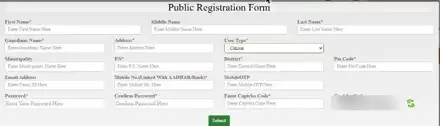
- Click SIGN UP at the top right. The Public Registration Form opens.
- Fill First Name, Middle Name (optional) and Last Name, Guardian’s Name and Address. User Type stays Citizen.
- Fill Municipality (if urban), P.S. (police station), District and Pin Code. Email is optional.
- Enter your Mobile No. (Linked With AADHAR/Bank), request the OTP and type it in MobileOTP.
- Set a Password, confirm it, type the captcha (use the green refresh icon for a new one) and click Submit.
Tip: Use a mobile number you will keep. Many land services send OTPs and SMS updates to it, and the portal has a separate service to update the mobile number recorded against a khatian.
Step 2: Sign In
- Click SIGN IN (or any service such as Know Your Property). The Login to Your Account window opens.
- Select Citizens (not Departmental Users).
- Enter your Username and Password, type the captcha and click Next.
- Forgot it? Use FORGET PASSWORD in the same window. Remember the portal asks you to change your password every 30 days.
Step 3: Check Khatian and Plot Details (Know Your Property)
- After login, click Know Your Property (house icon at the top).
- Select your District, Block and Mouza.
- Choose to search by Khatian number or Plot number and type the number from your deed, porcha or khajna receipt.
- Fill the captcha and view the details: raiyat name, share, plot area, classification and RS/LR plot numbers.
- Use RS-LR Information in Citizen Services if you only know the old RS plot number and need the LR number (or the other way round).
The on-screen details are for information. For a bank, court or registration office, request a signed RoR (porcha) / plot information / plot map copy under Service Delivery (see below).
Citizen Services Menu Explained
Click the Citizen Services icon on the home page. A menu opens with these groups:
Online Application
| Menu item | Use it for |
|---|---|
| Mutation Application | Record your name as the new raiyat after purchase, gift, partition or inheritance |
| Conversion Application | Change land classification (use) |
| Warish Application | Record legal heirs after the death of the raiyat |
| Land Revenue (Khajna) Application | Get the land revenue assessed and pay khajna online |
| Mobile Number update Against Khatian | Link or change the mobile number on your khatian |
| Appeal Application | Appeal against an order in a land matter |
| Fees Payment | Pay the fees of an application already filed |
Service Delivery
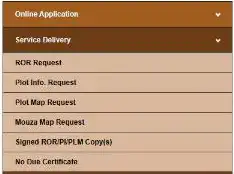
| Menu item | Use it for |
|---|---|
| ROR Request | Request a copy of the record of rights (khatian/porcha) |
| Plot Info. Request | Request plot information |
| Plot Map Request | Request the map of a plot |
| Mouza Map Request | Request the mouza (village) map |
| Signed ROR/PI/PLM Copy(s) | Download digitally signed RoR, plot information or plot map copies |
| No Due Certificate | Get a no-dues certificate for land revenue |
Online Service Status
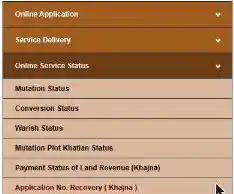
- Mutation Status, Conversion Status and Warish Status: track your case.
- Mutation Plot Khatian Status: see whether the plot and khatian have been updated after mutation.
- Payment Status of Land Revenue (Khajna) and Application No. Recovery (Khajna): check a khajna payment or recover a lost application number.
The same menu also has GRN Search (find a payment by its GRIPS reference), Mouza Map Availability Details, Application/Report Reprint, RS-LR Information, Land Classification and Online Fees Calculator. The fee calculator also asks you to sign in first; use it to see the exact mutation or conversion fee for your land before applying.
How to Apply for Mutation in West Bengal Online
- Sign in as a citizen and open Citizen Services > Online Application > Mutation Application.
- Enter the district, block, mouza and the plot/khatian details of the land, plus the deed details (deed number and year, registration office) or the inheritance details.
- Upload the documents asked on the form (usually the deed, the previous owner’s khatian/porcha, identity proof and khajna receipt).
- Check the fee in the Online Fees Calculator, then pay through Fees Payment (GRIPS). Note the GRN.
- Track the case under Online Service Status > Mutation Status. After approval by the BL&LRO, download the signed RoR from Service Delivery.
Before conversion: the portal reminds that conversion of land within the purview of the East Kolkata Wetlands (Conservation and Management) Act, 2006 needs sanction of the competent authority under Section 9 of that Act.
Common Problems and Fixes
| Problem | What to do |
|---|---|
| Login box opens when I click Know Your Property | Normal now. Register with SIGN UP and sign in as Citizens |
| OTP not received during sign up | Use the mobile linked with Aadhaar/bank; wait and request again; check DND/SMS blocking |
| Password stopped working | The portal forces a change every 30 days; use FORGET PASSWORD |
| Payment done but status not updated | Use GRN Search with your GRN; payments can fail during WBIFMS/GRIPS maintenance |
| Only RS plot number known | Use RS-LR Information to find the LR plot number |
| Pop-up hides the page | Close the Notification box with the cross mark at its top right |
Important Points
- Banglarbhumi registration and the information view are free. Do not pay agents for “khatian search”.
- Only banglarbhumi.gov.in is official. NaukriWatch is an information website, not a government portal.
- Keep your login private; the login window itself says not to disclose your password.
- Payments and GRN search can be unavailable during WBIFMS/GRIPS maintenance windows announced on the home page ticker.
- For a land purchase, also check registration records and pending cases and take legal advice; the online khatian alone does not prove the land is free of disputes.
Looking for another state? See our land records guide for all states.
FAQs
Q. Why is Banglarbhumi asking for login to see khatian?
A. Since the latest update, Know Your Property, Mutation Status and the fee calculator open the citizen login first. Register free with SIGN UP and sign in as Citizens.
Q. How do I register on Banglarbhumi?
A. Click SIGN UP, fill name, guardian name, address, P.S., district, PIN, mobile linked with Aadhaar/bank with OTP, password and captcha, then Submit.
Q. How can I check my khatian number online in West Bengal?
A. Sign in, click Know Your Property, select district, block and mouza, and search by khatian or plot number.
Q. How do I check mutation status on Banglarbhumi?
A. Sign in and open Citizen Services > Online Service Status > Mutation Status, then enter your case details.
Q. How do I get a signed porcha (RoR) copy?
A. Request it under Citizen Services > Service Delivery > ROR Request and download it from Signed ROR/PI/PLM Copy(s).
Q. What is RS and LR plot number?
A. RS is the plot number from the older Revisional Settlement; LR is the number from the Land Reforms settlement. Use RS-LR Information to match them.
Q. How do I pay khajna online in West Bengal?
A. Use Online Application > Land Revenue (Khajna) Application, then check Payment Status of Land Revenue under Online Service Status.
Q. How often must I change my Banglarbhumi password?
A. Every 30 days, as stated in the login window.
Source: Banglarbhumi portal (banglarbhumi.gov.in) home page, Citizen Services menu, Public Registration Form and login window, checked on 26 November 2026.
Official links
Always verify dates and fees on the official website before applying.
Get free job alerts
New govt, bank and teaching jobs, admit cards and results. No spam.