Last updated:
Want to see your Tripura land khatian (RoR), plot details or mutation status online? The Tripura Revenue Department runs eJami (jami.tripura.gov.in) under the Digital India Land Records Modernization Programme (DILRMP). You can view your khatian by name, khatian number, plot number or deed number, check mutation status with your MR number, see plot history, view the map and convert kani-ganda-kara into square feet, all free and without logging in.
This guide shows each eJami service step by step, the documents needed for every type of mutation (sale, will, partition, inheritance, lease, court decree, gift, exchange), the fee for a certified khatian copy and map, the official land unit conversions, and fixes for common problems. Everything is taken from jami.tripura.gov.in and the online mutation portal linked from it, checked on 26 November 2026.
Official links
Always verify dates and fees on the official website before applying.
Quick answer: Open jami.tripura.gov.in > VIEW YOUR ROR/ KHATIAN, choose District, Sub-Division, Revenue Circle, Tehsil and Mouja, pick a search criteria (Khatian No, Plot No Hal/New, Plot No Sabek/Old, Name, Registration No/Date/Type), type the captcha and click Display. For mutation status use KNOW MUTATION STATUS with your 9-digit computer MR number or 8-digit manual MR number. A certified khatian copy costs Rs 10 and a map Rs 30 at any tehsil office (Form-B).
Tripura eJami Land Records at a Glance
| Item | Details |
|---|---|
| Portal | eJami, jami.tripura.gov.in (Revenue Department, Govt of Tripura; built by NIC Tripura) |
| Districts | 8: North Tripura, West Tripura, South Tripura, Dhalai, Unakoti, Khowai, Sepahijala, Gomati |
| Free online services | View RoR/khatian, mutation status, plot history, plot transaction history, deed status (TORS), plot unit conversion, PDF map, tehsil and mouja lists, CERSAI mortgage check |
| Online mutation | Through the “MUTATION ONLINE” link on eJami (dlrstripura.in) |
| Certified khatian copy | Rs 10 per copy, map Rs 30, from any tehsil office using Form-B (valid 3 months) |
| Mutation status data | From 2011 till date |
| Languages | RoR can be displayed in Bengali, English, Hindi and many other Indian languages |
| Contact | Respective Deputy Collector & Magistrate; dlrs.tripura[at]yahoo.in |
Tripura Land Record Terms
| Term | Meaning |
|---|---|
| Khatian / RoR | Record of Rights showing owner name, plots, area and land class in a mouja |
| Mouja | Revenue village; the smallest unit you select on eJami |
| Tehsil | Revenue office below the revenue circle where khatian copies are issued |
| Hal / Sabek plot | Hal = new (current) plot number; Sabek = old plot number from the earlier survey |
| MR number | Mutation Register number of your mutation case, 9-digit (computer) or 8-digit (manual) |
| Mutation (namjari) | Correcting the khatian into the new owner’s name after a sale, inheritance or other legal transfer |
| Kani, Ganda, Kara | Local land units used in Tripura records (see conversion table below) |
How to View Tripura Khatian (RoR) Online: Step by Step
- Go to jami.tripura.gov.in and click VIEW YOUR ROR/ KHATIAN under citizen centric e-services.
- Select District, then Sub-Division, Revenue Circle, Tehsil and Mouja (names show in Bengali and English).
- Choose the display Language (Bengali is default; English and Hindi are available).
- Pick Select Your Search Criteria: Khatian No, Plot No (Hal/New), Plot No (Sabek/Old), Name, Registration No, Registration Date or Registration Type.
- Type the value, enter the captcha shown and click Display.
- The khatian opens with owner details, plots and area. Use your browser’s print option to save a copy for reference.
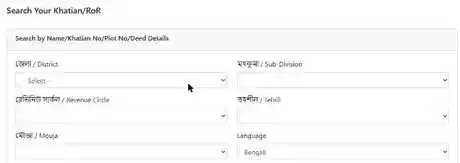
The online view is for information. For legal use (bank loan, court, registration), take a certified copy from the tehsil office or follow the department’s “online certified copy of RoR” video help on the eJami home page.
How to Check Mutation Status in Tripura
- On eJami click KNOW MUTATION STATUS.
- Select District, Sub-Division, Revenue Circle, Tehsil and Mouja.
- Under Search by MR Number, enter the 9-digit computer-generated MR number, or the 8-digit manual MR number given by the tehsil office.
- Type the code shown and submit to see the status. Records are available from 2011 to date.
eJami also lists “Sending of Notice / Mutation Incorporation status through SMS” among its features, so keep your mobile number correct in the application.
Other Free eJami Services
| Service | What you get |
|---|---|
| View Plot History | See changes recorded on a plot |
| Plot Transaction History (Property Registration) | Registration-side transactions on a plot or khatian (registration.tripura.gov.in) |
| Know Deed Status from TORS | Status of a registered deed in the Tripura Online Registration System |
| Status Report on Property Registration (TORS) | Registration status reports |
| Check Mortgage Status (CERSAI) | Whether the asset is mortgaged, through the central CERSAI registry |
| View PDF Map | Digitised cadastral map of the plot (Bhu-Naksha maps uploaded circle by circle) |
| Plot Unit Conversion | Convert kani, ganda, kara, square feet, hectare and acre |
| Tehsil List / Mouja List | Find the right tehsil and mouja names |
| Other Fee Payment for SROs | Pay registration and other fees online (eGRAS) |
| Land Bank | Government land bank information |
Tripura Land Units: Official Conversion
These values come straight from eJami’s Plot Unit Conversion tool (1 unit converted, checked 26 November 2026):
| Unit | Equals |
|---|---|
| 1 Kani | 20 Ganda |
| 1 Ganda | 4 Kara |
| 1 Kani | 17,280 square feet |
| 1 Kani | 0.4 acre |
| 1 Kani | 0.162 hectare |
| 1 Ganda (derived) | 864 square feet |
| 1 Kara (derived) | 216 square feet |
How to Apply for Mutation in Tripura
The “MUTATION ONLINE” link on eJami opens the online mutation portal (dlrstripura.in). Its FAQ explains that mutation means correcting the khatian in the name of the new owner, and warns that without mutation there is a risk of multiple sales, your heirs may lose the property, and banks do not accept land for mortgage without a mutated khatian. The application must clearly give land identification, name, address and the registered deed number and year.
Documents for each type of mutation (as per the official FAQ)
| Mutation type | Documents (uploaded online) |
|---|---|
| Sale | Registered deed (number and year) – mandatory; Non-encumbrance certificate from Revenue Officer – mandatory; affidavit – optional |
| Registered will | Registered will deed (number and year) – mandatory; non-encumbrance certificate – mandatory; affidavit – optional |
| Registered partition | Registered deed – mandatory; non-encumbrance certificate – mandatory; affidavit – optional |
| Inheritance | Survival / succession certificate (number and date) – mandatory; death certificate – mandatory; non-encumbrance certificate – mandatory |
| Lease | Registered deed – mandatory; non-encumbrance certificate – mandatory; affidavit – optional |
| Court judgement | Judgment/decree (number and date) – mandatory; non-encumbrance certificate – mandatory; affidavit – optional |
| Registered gift | Registered deed – mandatory; non-encumbrance certificate – mandatory; affidavit – optional |
| Exchange | Registered exchange deed (number and year) plus the supporting certificates listed on the portal |
The FAQ also lists supporting papers such as a copy of the original deed, via deed, parcha or khatian copy and land tax payment receipt. After you apply, note the MR number and track it on eJami.
Common Problems and Fixes
| Problem | Fix |
|---|---|
| Mouja not in the list | Check the Mouja List / Tehsil List on eJami; names appear in Bengali first. |
| No result for my name | Try khatian number or Hal plot number instead; spelling in Bengali records may differ. |
| Old plot number only | Use the search option Plot No (Sabek/Old). |
| Mutation status not found | Recheck the MR number (9-digit computer or 8-digit manual) and mouja; data starts from 2011. |
| Need legal copy | Apply at any tehsil office with Form-B: Rs 10 per khatian copy, Rs 30 for map; valid 3 months. |
| Wrong entry in khatian | Contact the respective Deputy Collector & Magistrate or the tehsil office. |
More land guides: land records for every state, Assam Dharitree jamabandi and ULPIN Bhu-Aadhaar explained.
FAQs
Q. How can I check my land record in Tripura online?
A. Open jami.tripura.gov.in, click VIEW YOUR ROR/ KHATIAN, select district to mouja, choose a search criteria like khatian or plot number, enter the captcha and click Display.
Q. Is eJami Tripura free?
A. Yes. Viewing khatian, mutation status, plot history, maps and unit conversion on eJami is free and needs no login.
Q. How do I check mutation status in Tripura?
A. Use KNOW MUTATION STATUS on eJami, select the mouja and enter your 9-digit computer MR number or 8-digit manual MR number.
Q. What is the fee for a certified khatian copy in Tripura?
A. As per the official FAQ, Rs 10 per khatian copy and Rs 30 for a map, from any tehsil office using Form-B. The copy is valid for three months.
Q. How many square feet is 1 kani in Tripura?
A. eJami’s converter shows 1 kani = 17,280 sq ft = 20 ganda = 0.4 acre = 0.162 hectare. 1 ganda = 4 kara.
Q. Which documents are needed for mutation after sale?
A. The registered deed number and year and a non-encumbrance certificate from the Revenue Officer are mandatory; an affidavit is optional.
Q. Can I search by old plot number?
A. Yes. Choose Plot No (Sabek/Old) in the search criteria.
Q. Can I see the khatian in English?
A. Yes. Select English (or Hindi) in the Language box before clicking Display.
Source: Tripura Revenue Department eJami portal (jami.tripura.gov.in: home page services, Search Your Khatian/RoR, Know Mutation Status, Plot Unit Conversion) and the online mutation portal FAQ linked from it, checked 26 November 2026. NaukriWatch is not a government website.
Official links
Always verify dates and fees on the official website before applying.
Get free job alerts
New govt, bank and teaching jobs, admit cards and results. No spam.